I would love to see Tape add an org-level audit trail with two views: an Activity Log capturing material actions taken by members (things like record deletes, bulk edits, imports/exports, settings changes), and a Sign-In History capturing member logins with timestamp and source IP. This would be surfaced at the organization/account level, filterable by date range and event type.
Problem / Use Case
As a Tape consultant managing client accounts, I regularly need to answer questions like “who deleted these records?”, “when did this bulk reassignment happen?”, “did anyone export contact data, and how much?”, and “who logged in, from where, and when?” Today there’s no built-in way to reconstruct this. When something goes wrong — an accidental mass delete, an unexpected data export, a config change that breaks an automation — there’s no trail to investigate, attribute, or audit. This matters most for accounts with multiple team members, admin handoffs, or any client with data-governance or security expectations.
Proposed Solution
Two tabs under an “Account Log” (or “Audit Log”) area, accessible to admins:
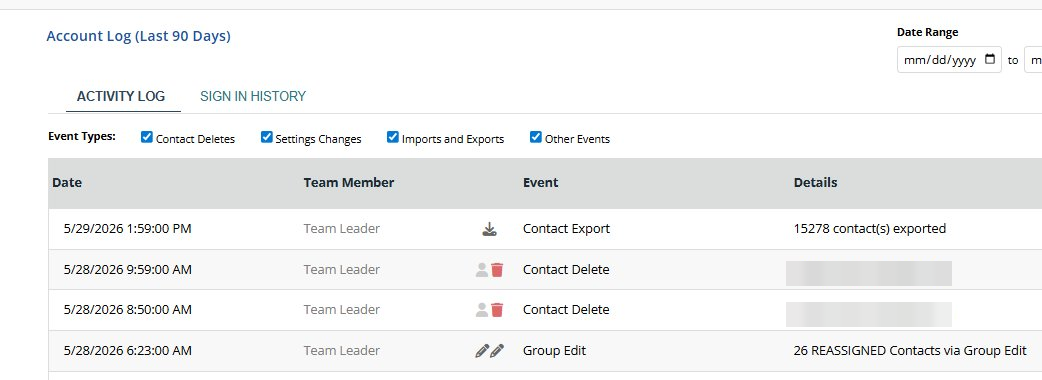
1. Activity Log — a chronological record of significant member actions, with columns for things like Date/Time, Member, Event, and Details. Event categories I would suggest to be worth covering:
- Record deletes (single and bulk), with count and source app
- Bulk/group edits and reassignments (e.g. “26 records reassigned via group edit”)
- Imports and exports, with record counts
- Workspace/app/automation settings changes
- Member and permission changes
- An “Other Events” catch-all
Filtering by event type (via checkboxes) and by date range, exactly as the attached reference shows.
2. Sign-In History — a log of member authentication events: Date/Time, Member, event (Sign In), and source IP address. This supports security review and helps spot unfamiliar access.
Reference
The two attached screenshots (PII redacted) show this pattern implemented in another platform. They illustrate the tab structure, event-type filtering, date-range control, and the level of detail that’s useful — e.g. an export row noting the number of records exported, a delete row attributing the action to a member, and sign-in rows logging IP addresses.

Why It Matters
- Accountability & troubleshooting — quickly attribute and reconstruct what happened when data changes unexpectedly.
- Security — sign-in/IP history surfaces unusual access; export logging surfaces potential data exfiltration.
- Trust & enterprise readiness — audit trails are a common requirement for clients evaluating a platform for sensitive data, and a frequent gap that comes up when comparing Tape to alternatives.
- Admin confidence — makes delegating access to team members far less risky.
Nice-to-Haves (not required for v1)
- Export the log itself to CSV
- Configurable retention window (the reference shows “Last 90 Days”)
- Drill-down from a log entry to the affected record(s) where they still exist
- Optional webhook/notification on high-risk events (mass delete, large export)
- API access to the audit log for accounts that want to pipe events into their own tooling
I will note that some of these the events do have some availability through the API. For example, in some orgs we currently monitor for record deletion in critical apps and keep a log on our own when records are deleted. Our log records a timestamp, the deleted item’s title, who took the action, etc. What’s available now requires that for every single app in the system we have to build that as a rule for each app over and over. A central activity log like this could save headaches and situations where the manual log entries weren’t built in new apps.
Does anyone else have a similar need for visibility into data like this?