Hi there,
I would love to have a way to anonymise or pseudonymise records via automation. Why?
I could keep the records with non personal identifiable data for analysis without the need to delete them.
Example: HR App - applications should be deleted after roughly 6 months of time after a decision is made. No need to store personal data after that timeframe.
For using dashboards and analysis it would be good to keep the record and certain meta data - but fields like Name, E-Mail, Telephone Number, Cover Letter should be deleted without revisioning.
Maybe it just needs a hard delete action, that makes it impossible to revert the delete for the selected fields?
Am I dim on this - why can you not just automate replacing the relevant fields with other data so for example:
phone: 8888-888888
email: noone@doman.com
etc?
Then you keep the original record and any relations for reporting but remove any personal information?
I did use this workaround. Copied a record field by field into a new record and deleted the old one. Even the automation log doesn’t contain any relevant data - which is good.
The problem with this process is, that any other update with fields in the application requires a potential update in the automation. But this also happens with defining the fields to be deleted without history. It would still be easier, if I had e.g. an automation module, which is “clone record”, which would automatically map the fields and let me adjust them as needed and how to handle new fields added later. But thats just an improvement of the above process.
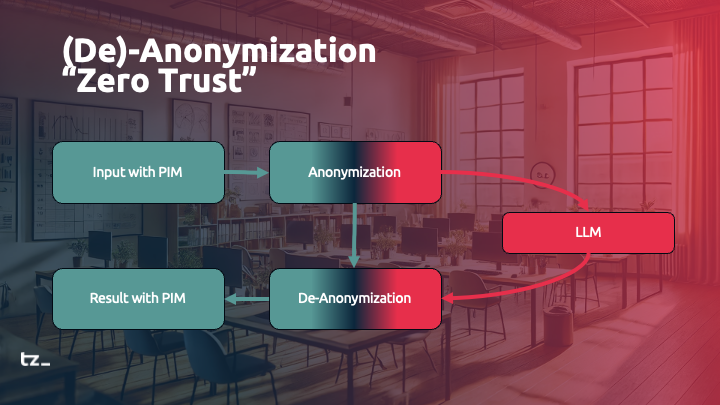
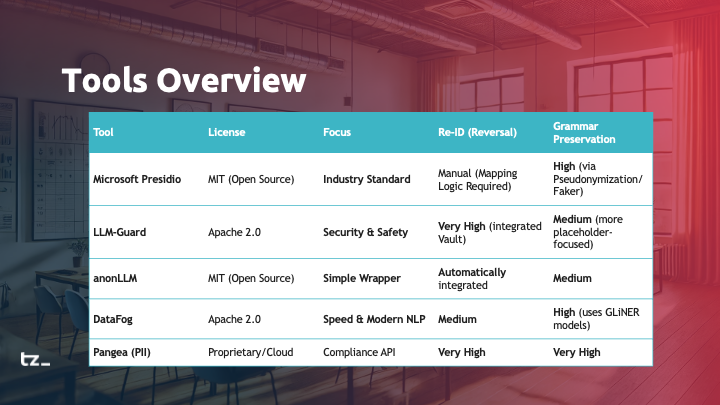
Re. Pseudonymisation: using MS Presidio with Tape/LangDock?
Hi, I am not an IT person (I am a monitoring & evaluation / impact assessment expert for non-profits) but I’m enthusiastic about using tape for collaborative data collection - and increasingly also AI analysis (connected my Tape Apps to LangDock via API). Works like a charm - BUT: the interviews I store, transcribe, and extract structured data from comprise loads of personalized data. In order to comply with GDPR, I will have to pseudonymise before sending these to the AI – even when EU residence is provided (LangDock), and then de-code afterwards to continue working in Tape with the specific PII data (do let me know should this assumption be false!).
Trying to solve this, I played with MS Presidio (Home - Microsoft Presidio ) and vibe coded a local python app based on Presidio including various language packages - it works quite well.
YET: I probably can’t install language libraries on Tape, correct? I would need a proxy?
So my question is: does anybody here have experience with using Tape & LangDoc & pseudonymisation e.g. with Presidio?
Tx a million for any clues on how to pseudonymise personal data.
Best wishes, Konny
There’s probably a better way, but here’s a non-destructive approach that might get your wheels turning.
The idea: keep your raw PII inside Tape, but build a pseudonymised version in a separate calculation field that’s what gets sent off.
Rough structure:
Raw data field (hidden) - holds the original interview text with real names, emails, etc.
PII fields - one per data type (Name, Email, Phone, Address). You manually populate these with the actual values from the interview.
Pseudonym fields - one per PII type, auto-populated by automation with a randomized ID (e.g., “PERSON_4471”, “EMAIL_4471”). You could use the item ID for this.
Pseudonymised output (calculation field or Automation to a text field) - pulls in the raw data and uses regex to swap each PII value with its matching pseudonym. This is the field your API call references.
To decode afterwards, you’d run the reverse: another calculation field (or Automation to text field) that takes the AI output and swaps the pseudonyms back to real values.
The catch is regex inside Tape calculation fields can be finicky with edge cases (partial matches, capitalization), but for clean structured PII it should hold up.
Hi, wow - tx a million for the speedy reply and the warm welcome!
Not quite sure I fully understood your suggestion, but not being an IT person, I may well have missed your point entirely! (sorry).
The issue is that there is a load of PII in each interview - ca. 10 pages of transcript each - and I want to scale so possibly will have 100s of interviews. I simply cannot create an extra data field for each PII instance in each interview, there are far too many. What I need is for the entire interview text to come out the other end with all PII replaced by codes, exactly as Presidio does.
Presidio produces both the pseudonymised transcript and a codebook for re-identification (at least my vibe coded app does). But it needs language libraries (spaCy models) to recognise names, dates, emails etc. and I’m not sure how or whether those can be connected to Tape.
Do you have experience integrating Presidio (or a similar tool) with Tape automations?
I don’t know regex but will check it out! THANKS!
Warm regards, K.
Hi, this is quite a big subject, so a few assumptions/clarifications first:
You’re OK with personal information being stored in Tape
The information you want to remove includes names (important, as this rules out purely regex-based approaches)
You’ve tested Microsoft Presidio and it does what you need (noting that some recognisers, like phone numbers, are more US-focused out of the box)
spaCy is, somewhat annoyingly, still one of the best options for this type of NLP task (annoying mainly because it’s Python), and Presidio relies on it for name detection.
So a simplified workflow would be:
Run Presidio in Docker on a small VPS
Send transcripts from Tape to Presidio
Receive the anonymised result back into Tape
Then pass that on to LanDock
There are Node/JS alternatives to spaCy, but they’re generally less reliable for name detection. In practice, they also wouldn’t simplify things much here, as you wouldn’t be able to run them directly inside Tape anyway.
So to clarify:
No, you can’t install your own libraries in Tape, and spaCy wouldn’t be usable there regardless
Yes, you need a proxy service. A VPS running the Microsoft Docker image is a straightforward approach (just make sure it’s properly secured, e.g. private network or authenticated endpoint)
This community is amazing! Tx so much for your reply!
Ok, that’s really helpful. So no need worrying about Presidio in Tape - I will explore VPS/Docker instead. Will be a steep learning curve - but I hope AI can assist : -)
I originally started this thread a while ago, and it’s been interesting to see how the discussion has evolved since then. I wanted to briefly share my current perspective after digging deeper into the topic.
In the context of preparing a low-code training, I took a closer look at pseudonymization - and it turns out to be more nuanced than it might seem at first glance. It’s not just a technical problem; it’s about choosing the right approach and understanding the trade-offs between different methods. (I’ve also incorporated this conceptually into our Level 3 “LowCode, AI and Automation” training.)
One aspect that stood out to me is the role of grammar. If you simply replace tokens, the quality of generated text can degrade quickly. Ensuring that responses remain grammatically correct is not just a “nice to have” - it’s essential for usability.
I also revisited different approaches:
“Speaking IDs” can preserve grammar quite well, but come with their own implementation challenges.
Shadow tables offer flexibility, but introduce additional overhead, especially in terms of context window usage and system complexity.
My takeaway: there is no one-size-fits-all solution here - only context-dependent decisions.