This is a fairly technical and advanced post.
I have been meaning to make some videos showing this approach in practice, but as that has not happened yet, I thought I would write up some of the principles behind how we build Tape-first systems.
Tape as the Operational Source of Truth
In my view, Tape is still incredibly difficult to beat as an operational platform.
It excels at:
- Entering and manipulating operational data
- Automating workflows
- Receiving and distributing information
- Scaling with both technical and non-technical users
- Rapidly adapting to changing business processes
The key principle behind everything we build is this:
Tape remains the operational source of truth.
All updates, operational actions and workflow logic happen in Tape first.
However, operational systems and high-performance public-facing systems are not always the same thing.
Sometimes you need:
- Public web pages
- Client portals
- Role-based dashboards
- Search-heavy interfaces
- Real-time map displays
- Large-scale read access
- Complex aggregated views
These are all things Tape can power, but they are not necessarily things that should rely entirely on live API reads for every request.
Examples of Systems We Have Built on Tape
Some examples from recent projects:
- Client portals
- Client onboarding systems
- Association management system (clubs, members, roles, uploads, CMS-driven website)
- Location plotting systems
- Email systems linked to CRM records
- Link shorteners
- Secure document portals
- Training platforms
- Secure ordering systems with client-specific product access
- Holiday approval systems
- Expense approval systems
What these systems all have in common:
 External web front ends
Tape as the source of truth
Dynamic behaviour driven by Tape data
Our own internal platform, Aurora Gate, is heavily built around this principle.
For example, notes relating to projects or clients are editable directly inside Tape, but are also viewable and editable inside Aurora Gate. This allows them to be securely shared with external systems and users while still keeping Tape as the operational source of truth.

Editing a note inside Aurora Gate
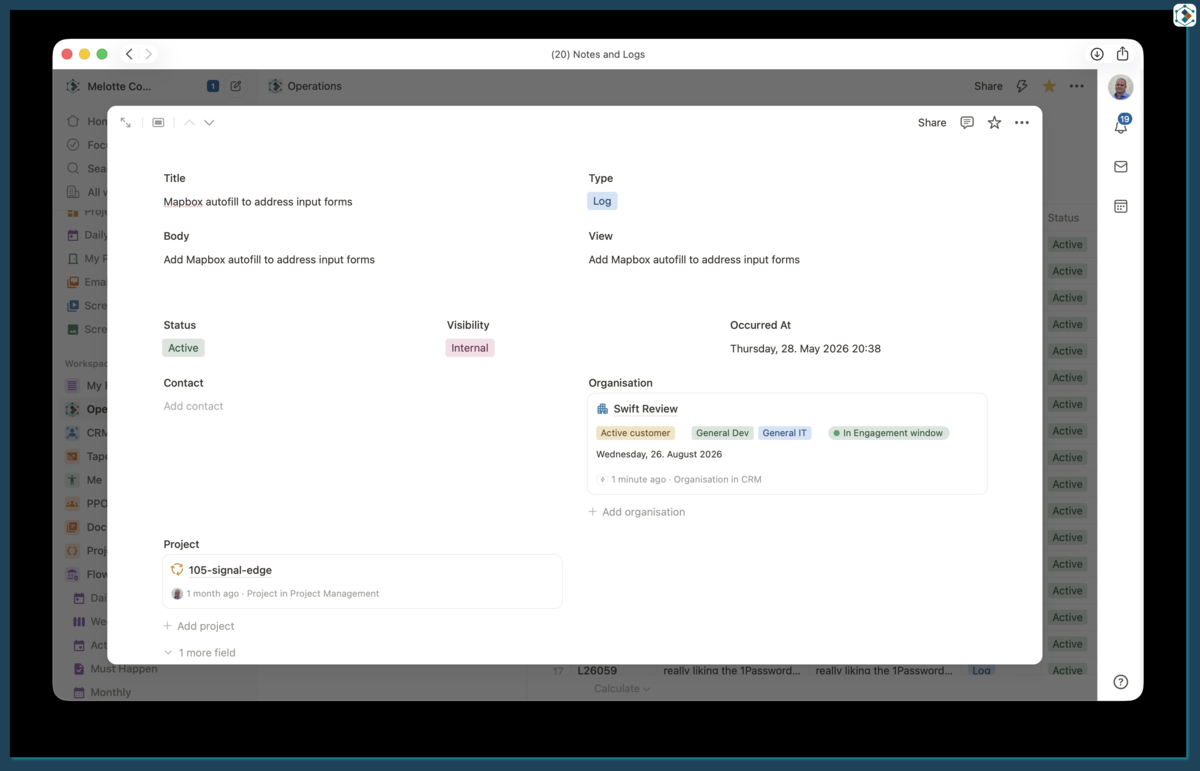
The same note inside Tape

A bonus is Mobile
In this example, I can edit a note in Tape, mark it as public and immediately generate a share link. The public version updates almost instantly.

The Problem With Live API Reads
Tape has a very capable API and it is fast.
However, imagine a visitor opening a public note page.
If every request queried Tape directly, the application would need to:
- Query Tape
- Locate the record
- Validate that the record is public
- Transform the content for display
- Render the final page
That may sound perfectly reasonable, but this process happens on every request.
Now multiply that across:
- Multiple records
- Related applications
- Complex views
- External systems
- Large numbers of users
Performance quickly becomes a problem.
When we are aiming for highly optimised web experiences, even relatively small delays become noticeable.

100% Lighthouse score
And that is for a relatively simple page.
What happens when you start building more complex interfaces pulling data from multiple applications and systems?
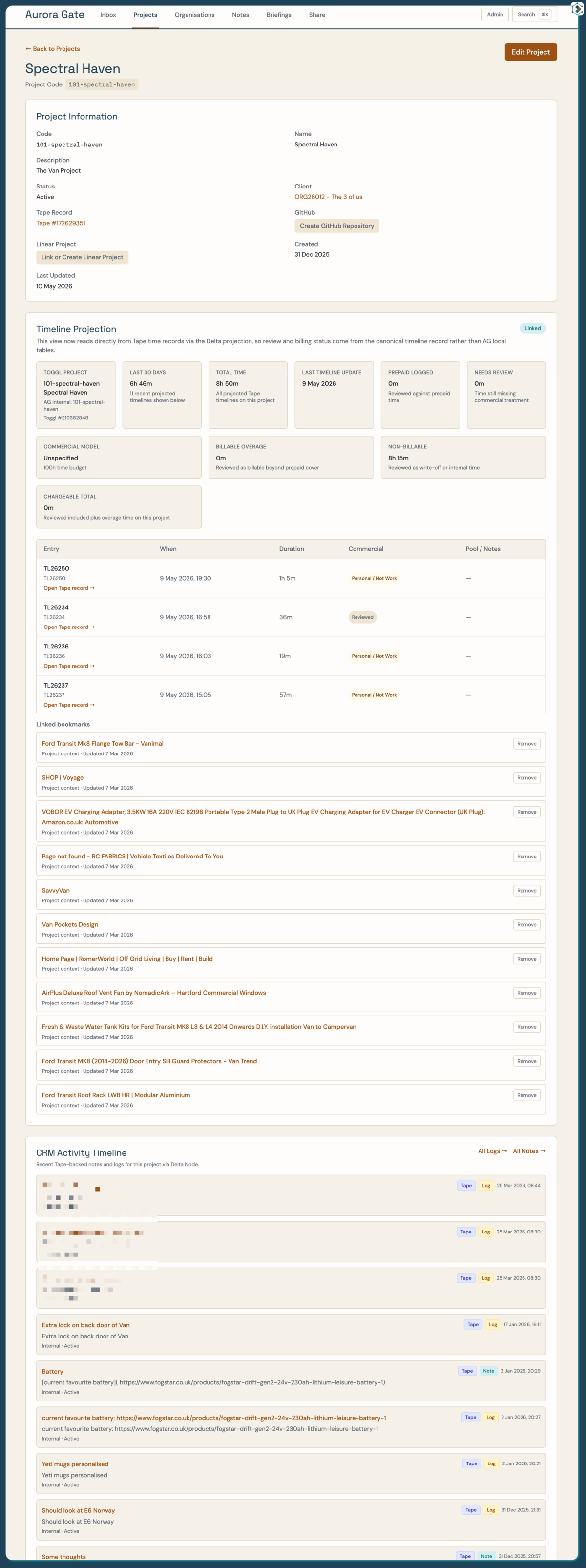
A complex Page
In Aurora Gate, pages like this still achieve extremely high performance scores.
That simply would not be possible if every piece of data required live API calls back to Tape during page rendering.
So How Do We Solve This?
Simply put:
We cheat.
We use Projection Tables.
A Projection Table is effectively a read-optimised copy of selected Tape data that stays synchronised in near real time.
If you come from a traditional software architecture background, these are essentially read models or projection views.
Instead of querying Tape directly for every page request, our applications query the Projection Tables instead.
This gives us:
- Extremely fast reads
- Predictable performance
- Reduced API load
- Better scalability
- Easier aggregation across systems
The important point is this:
Tape is still the source of truth.
Projection Tables are only optimised read models.
All writes still happen in Tape.
Delta Node
As we built more systems, we realised we were repeatedly building similar synchronisation logic and duplicating API calls.
So we built a system to automate Projection Table provisioning and synchronisation.
We call it Delta Node.
Delta Node allows us to:
- Create Projection Tables automatically
- Keep them synchronised with Tape
- Reuse the same projections across multiple systems
- Minimise API usage
- Provision infrastructure quickly
For example, Aurora Gate and our client portal both use the same client Projection Tables while presenting the data differently.
How Delta Node Works
Inside Delta Node you can:
- Select a Tape organisation
- Select a workspace
- Select an application
- Choose which fields should be included in the Projection Table
All of this metadata is pulled live from Tape via the API.

Application selection

Field selection
Once configured, pressing Provision Projection will:
- Create a new database table
- Create synchronisation endpoints
- Configure Tape webhooks
- Optionally backfill existing records
- Keep the Projection Table synchronised in real time

Webhook provisioning

Real-time synchronisation
Backfills and Scaling
Backfills are one of the areas where systems can go wrong very quickly.
Synchronising a handful of records is easy.
Synchronising thousands of records while staying within API limits is a very different problem.
Because of this, Delta Node offloads backfills into separate background workflows which process records safely and incrementally.
This keeps the system responsive while avoiding spikes in API usage.
A Small Bonus
Sharp-eyed readers may notice an additional webhook:
App Updated
The Tape team quietly added this at some point. Last time I checked it was not yet documented in the API documentation, but it is actually extremely useful when building synchronisation systems.
Final Thoughts
Projection Tables have fundamentally changed how we build on Tape.
They allow us to:
- Keep Tape as the operational source of truth
- Deliver extremely fast web experiences
- Scale to more complex systems
- Reduce API overhead
- Share consistent data across multiple applications
The important mindset shift is this:
Tape is the operational layer.
Projection Tables are the delivery layer.
Or more simply:
Write to Tape. Read from Projection Tables.

