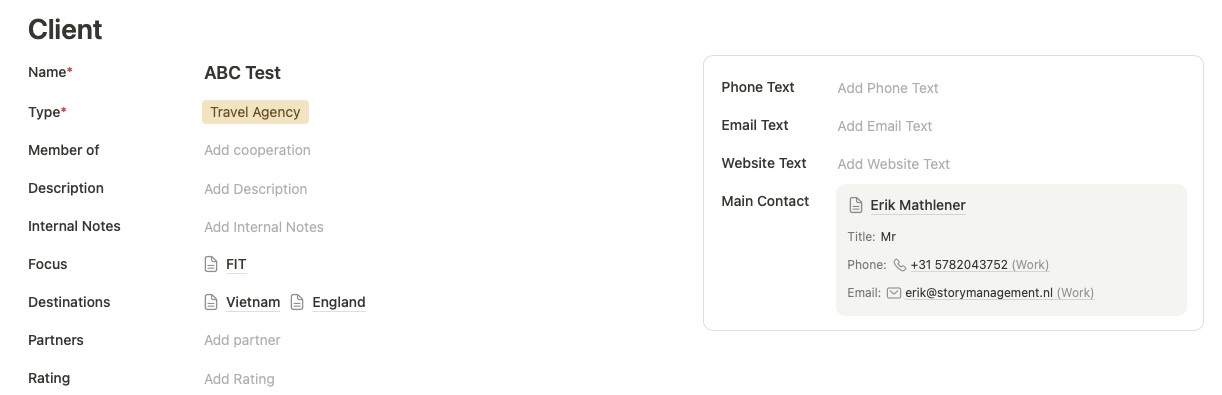
I created a New Record Layout for the table Clients. On the right, there is a block with some contact information. The main contact for the client shows up perfectly. The idea is of course that the user can click on the name, and another screen opens with that particular record.
Here is the problem: clicking sometimes work, sometimes it doesn’t. I have to click several times on different areas to get to the undelying record.
That should indeed work normally, so we’ll take a closer look.
It may be a specific case we haven’t covered properly yet with testing: a relation card placed inside a box block. That could explain why the click handler doesn’t always behave reliably in this setup. We’ll take a closer look and investigate it.
I’ll get back to you if I need any additional information! Or ideally once we’ve fixed it directly.
we tested this quite extensively on our side with the exact same kind of setup you’re using here: a two-column layout, this specific relation card style, and the card placed inside a box block.
Unfortunately, the issue did not appear in our test scenarios so far.
Could you let us know which browser and operating system you’re using? That would also help us narrow it down.
Would it be possible for you to invite me to this specific record, or add me as a guest to your organization, so I can take a closer look directly in your setup? My email is leo@tapeapp.com.
That would help us a lot to check whether I can reproduce the same behavior on my side as well. It would also allow us to rule out whether this might somehow be related to permissions or a read-only state in that specific context.
Thanks again for your help here, and sorry that you’re running into this issue. We’ll do our best to get to the bottom of it.
Leo
thank you very much for the update and for your help with debugging this
Yes, unfortunately these are often the most difficult issues! When something appears only sporadically and then suddenly works again. But the information about your operating system and Safari version already helps us a lot.
We will now look specifically into Safari, as Safari can behave a bit differently with click handlers in certain situations. We will run several tests on our side and try to reproduce this in our lab environment.
If we still cannot identify the cause, I may come back to you and ask whether temporary access would be possible. I really hope we can find it without that, but if access becomes the last step, I am confident we will be able to track it down.
Thanks again for your support and for keeping us updated.
thank you again for the additional context and for sharing your Safari and macOS details.
We have now tested this quite extensively in our lab environment, specifically in Safari and with the same configuration you described: a two-column record layout, the relation card in this style, and placed inside a box block.
Unfortunately, we still haven’t been able to reproduce the issue on our side.
Would it be possible for you to invite me to this specific app or record so I can take a closer look directly in your setup? You can simply add me as a guest to your organization using leo@tapeapp.com.
That would help us a lot to check whether the issue also appears for me in your environment, and to better understand what might be different there compared to our test setup.
Thanks again for your patience and support here. We really appreciate your help with narrowing this down.
Last week, the clicking worked perfectly. And now, it stopped working again. So strange, as if the system has it good and bad days.
I gave you guest access last week, did you manage to try it yourself?
Thank you very much for your message. Could you please check the guest access and send me another invitation? I checked my inbox again, but unfortunately, nothing seems to have arrived. Otherwise, I would already have taken a closer look.
The behavior is indeed very strange. I tested this across different devices and operating systems, but with issues like this, we sometimes need to investigate the exact setup. A click handler or another small detail may occasionally block the interaction.
It would therefore be great if you could send me a new invitation. I will investigate it over the weekend and share my findings with you as soon as I identify anything, and by Monday at the latest.