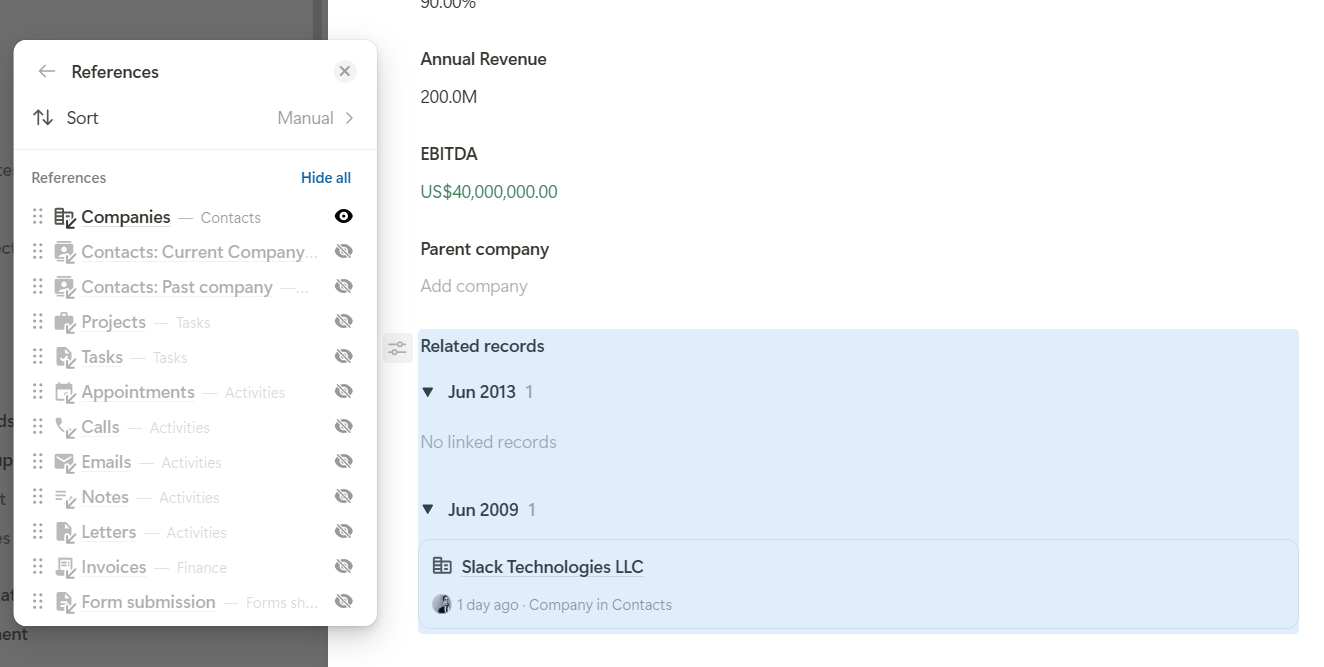
In short, I want to take my related fields, turn all of them off except for one, and then group them by date. When I go to create a new field, it prompts me to choose from a list of related apps. How do I turn that off?
I just tested this myself, and you are absolutely right. When grouping by date, the current setting for hiding individual references is not being respected.
If you turn off all references except one in this menu:
then the disabled references should of course no longer appear in the “Create new record” overlay. And if only one reference is still shown after grouping by date, the overlay should not appear at all during creation.
We already have a fix in our pipeline. I’ll let you know once the fix is live. It should go live during the day tomorrow, and then this issue should be resolved.
We ran into this same issue again on July 15th…seems like it hasn’t been fixed quite yet.
We also seemed to notice that it didn’t keep the previous setting if we toggled back and forth between the group by options. That felt like a waste of time because we weren’t trying to change the whole field. We were simply trying to say, “Wonder if it looks better this way or this way,” but we had to sit and click a bunch of options each time we switched back and forth to figure that out.
thank you both again for your reports. And @1F2Ns, thank you very much for your kind and positive feedback about the new record experience. It really means a lot to us!
The original issue, where disabled references were still shown in the “Create new record” overlay, had already been fixed some time ago.
However, we later identified another issue where the selected sorting order was not applied correctly. We also investigated the issue reported by @CarsonRedCliffLabs, where the previous settings were lost when switching between the grouping options.
All of these issues have now been fixed. The references, sorting order, and saved settings should now work correctly and consistently.
This update led me to another question that I ran into today about limiting what options are seen on these new related fields.
If new apps start having relationships that point back to apps that use reference fields, will those pre-existing reference fields default to showing all inbound references, or only those that were explicitly turned on to view when the reference field was first created?
Example - I was building out a new CRM workspace for a client. I added a field called ‘referenced activities’ and at that time, activities was the only other app available to select there. Which was perfect, that is what I wanted.
But I know that soon there will also be Projects, Contacts, and other apps pointing back to this same app.
Will I have to go back and update the ‘referenced activities’ field to turn off those others anytime something new is added?
In this use case, that would be annoying. But I’m positive there are other use cases (such as someone trying to use the reference list as a universal visibility at the bottom of the record just like the legacy layout had) where it would be a bigger annoyance to not have new references automatically displayed. So how should we manage this?
That’s a really interesting question, and it’s actually something we thought about carefully during the implementation as well
We decided on the following behavior: as long as you haven’t manually hidden any references, every new inbound reference that is added later will automatically be shown as well.
However, as soon as you consciously decide to hide individual references, we treat that as an explicit selection. From that point on, any new references that are added later will not automatically appear.
This way, the user always stays in control: you can either follow the default behavior and simply show all references, including any new ones added in the future, or you can explicitly choose exactly which references you want to display.
So in your CRM example, once you hide references you don’t want and thereby make an explicit selection, you won’t have to keep coming back to turn off every new reference that gets added later.
Thanks a lot for bringing this up. It’s a great question and exactly the kind of detail that becomes important when building more complex app structures.
Will you consider the equivalent as a feature request for the different views? When adding new fields to an app, they automatically show and then all views have to be touched again to remove them.
thanks @Leo
It’s so reassuring to know that there is a well thought out rule on situations like this. And to understand the explicit rule so that I know what to tell others to expect when building within Tape. Very valuable info here.
Also, I 100% agree with @1F2Ns that this same approach would make a lot of sense for saved views.
If an ‘all data’ table view exists in an app, then new fields would show up as columns on that view without having to manually include them.
But if someone has already dialed in a view with the explicit fields/formatting they want, then it would be great if new fields did not automatically show up in that view and cause someone to edit and re-save the view to keep it ‘perfect’