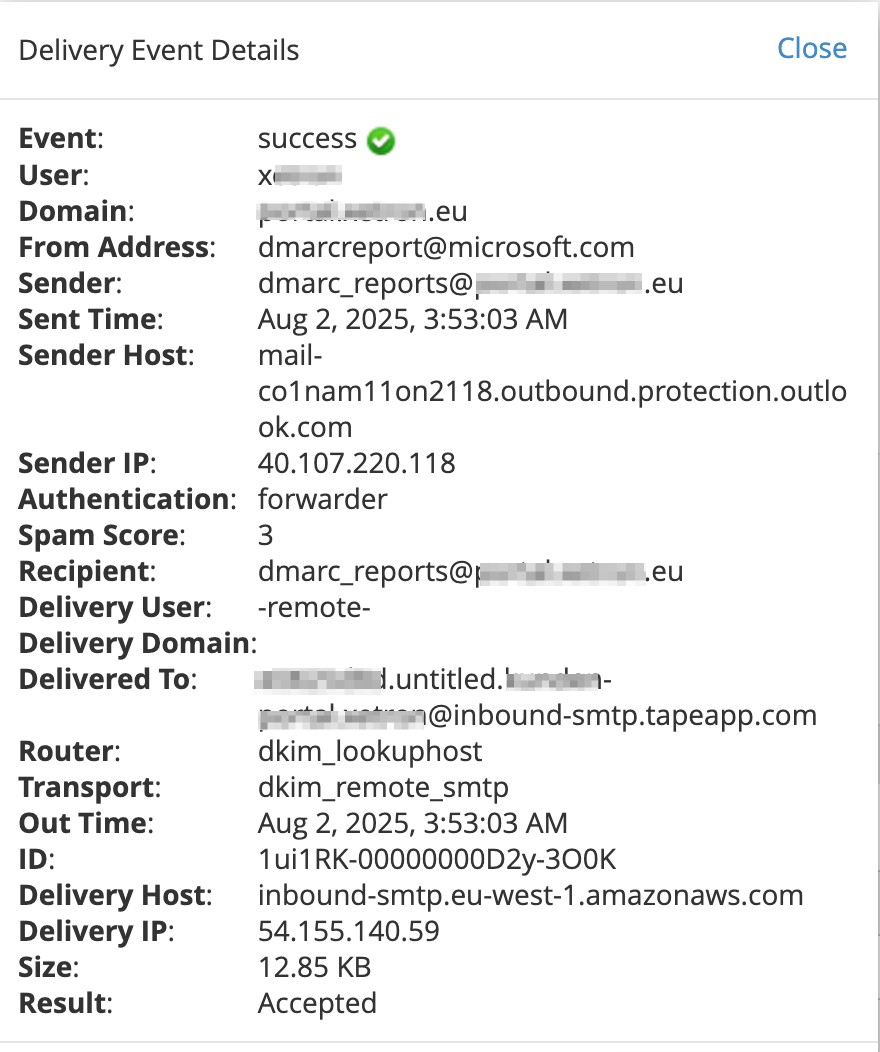
I’m forwarding DMARC reports to a centralized Tape app within a customer’s organization, using the ‘Public email address’ functionality. These emails are routed through the company’s main email server.
The server logs indicate that the emails are successfully sent to Tape, with detailed confirmations of delivery. However, the messages are not appearing in the app.
Interestingly, if I send an email directly from my personal address to the app, it works as expected. This suggests that the issue might be specific to how the messages are processed when sent via the company’s mail server.
It’s confusing that the server log reports successful delivery, yet the app does not display the emails. I’d appreciate any help in identifying where the discrepancy lies.
Can you send the email to your email, and then forward to the public tape email. Just to see if that works.
This will help troubleshoot and potentially provide a workaround until everything is resolved.
I have not looked at a public email address and tape and quite some time and I’m on my phone so I’m going for memory. I wonder If there are any characters in the tape email address that the server is stripping out?
What’s puzzling is that it worked when I initially set it up at the beginning of 2025. It stopped functioning around May 2025. That’s why I don’t believe the issue is related to the email format or the attachment itself. Also, when I forward the same email to myself, I can then send it to Tape without any issues.
That’s interesting. Do you have access to a different domain on the same server? Try sending from there to further confirm it’s not isolated to the original domain and Tape.
I hate chasing email bugs because of all the moving parts.
That does indeed sound like strange behavior, especially since nothing was changed on your end and it suddenly stopped working. Also, thanks a lot, @1F2NS, for jumping in and helping narrow things down!
We’ll also do a more detailed analysis on our end. We actually haven’t touched anything in our internal email modules or infrastructure recently either, which makes this all the more puzzling. But as we all know, email reception can be quite tricky - there are a lot of moving parts involved, and it’s often unclear what exactly causes issues like this.
As @1F2NS suggested, we’ll dig into the details and follow up here as soon as we know more.
SMTP error from remote server for RCPT TO command, host: inbound-smtp.eu-west-1.amazonaws.com (54.155.140.59) reason: 550 5.7.1 IP address blacklisted by recipient
We have this issue now also with a client. There needs to be some whitelisting maybe? The application stops working, if we can’t rely on mails to arrive in the application. Could you disable the SPAM checking as an quick solution? There shouldn’t be much spam anyways with this kind of “obfuscated” E-Mail addresses…
Hi Rico, @Kollaborateur,
did you forward (forwarding address is sender) or reroute (original address remains sender) to the tape email address?
In our case its rerouted. So the original sender remains intakt, gets blocked by the TapeApp AWS Spam filter. The Mail Server, that rerouted the mail gets the bounce information. Its error message arrives in the same inbox, gets rerouted to the TapeApp and gets accepted (not blocked by Spam Filter in TapeApp AWS).
Thanks a lot for the report and sorry for the issue. We’ve already started the analysis. So far, AWS has always handled this reliably, and we’ve had very few reports of emails not coming through. But you’re right — whitelisting might indeed be the best solution here.
Thanks as well for sharing the detailed information via DM that’s really helpful. We’ll use it to make sure the emails are delivered as quickly as possible. We’ll keep you updated as soon as we have the first fixes in place.
Having said that, whitelisting would probably not work for scenarios like rerouting Support requests to an Tape App. The good thing is to keep the senders address as sender, instead of the forwarding address. While the sender doesn’t know our app address.
If its possible to deactivate the spam checking, I would prefer this. The App address is obfuscated enough and if its every getting spammed, we could assign a refreshed address to the app.
For everyone else interested - @Tim and @Leo applied a hotfix, where we white listed some involved mail server IPs and the issue was solved. Team Tape now thinks about a more general solution for this issue.
it’s reroute for us as well – at least with the project where we first realized there’s an issue. The main problem is that it’s very hard to monitor or even detect when emails are being blocked. In our case, we’d essentially have to check the server logs daily and compare them against the emails that actually reached the Tape app in order to figure out which ones were blocked.