Quick reference for Tape calculation fields: syntax, functions, and recipes for the new editor.
- Part 1: Syntax & field references
- Part 2: Functions & HTML output (this post)
- Part 3: Dates, Markdown & recipes
- Part 4: Best practices & troubleshooting
We built a demo workspace to try things out. ➔ Duplicate it
Part 2 of 4. Strings, numbers, arrays, and all eight pre-loaded libraries — plus HTML/CSS output and link & button components. Dates and Markdown output are in Part 3. For syntax basics, see Part 1.
This cheat sheet covers the new calculation editor in the new record experience. For details on the editor itself (autocomplete, live preview, fullscreen, Find & Replace, multi-cursor, classic vs new, migration), see the announcement post in the Tape Community.
Two key rules in the new editor:
- No
@in saved code.@is just a search trigger; the saved field reference is the bare name.- Spaces become underscores.
First nameis written asFirst_name.
Each section and recipe shows the fields it uses with their type. Replace the field names with your own; spaces in your field name become underscores in the code (e.g.
Hourly Rate→Hourly_Rate).
Strings
Manipulate text fields: search, replace, slice, format. All standard JavaScript string methods are available.
| Function | What it does | Example | Result |
|---|---|---|---|
.length |
Character count | "hello".length |
5 |
.toUpperCase() |
All caps | "hello".toUpperCase() |
"HELLO" |
.toLowerCase() |
All lower | "HELLO".toLowerCase() |
"hello" |
.trim() |
Strip whitespace | " hi ".trim() |
"hi" |
.includes(s) |
Contains substring | "hello".includes("ell") |
true |
.startsWith(s) |
Begins with | "hello".startsWith("he") |
true |
.endsWith(s) |
Ends with | "hello".endsWith("lo") |
true |
.replace(a, b) |
First match | "a-b".replace("-", "_") |
"a_b" |
.replaceAll(a, b) |
All matches | "a-b-c".replaceAll("-", "_") |
"a_b_c" |
.split(s) |
Split into array | "a,b,c".split(",") |
["a","b","c"] |
.slice(a, b) |
Substring | "hello".slice(1, 4) |
"ell" |
.padStart(n, "0") |
Left-pad | "7".padStart(3, "0") |
"007" |
.padEnd(n, ".") |
Right-pad | "7".padEnd(3, ".") |
"7.." |
.repeat(n) |
Repeat | "ab".repeat(3) |
"ababab" |
Examples
Field types: First name [Text], Last name [Text], Description [Text], Slug [Text], Title [Text], Note [Text]
Output type: Text
// Initials
First_name[0] + Last_name[0]
// Formatted ID like "PRJ-007"
"PRJ-" + String(Record_ID).padStart(3, "0")
// Split slug into readable words
Slug.split("-").join(" ")
// Truncate to 80 characters with ellipsis
Description.length > 80
  ? Description.slice(0, 80) + "…"
  : Description
// Title-case a single-word slug
const slug = Slug
slug[0].toUpperCase() + slug.slice(1).toLowerCase()
// Title Case (every word capitalized)
Title.toLowerCase().replace(/\b\w/g, c => c.toUpperCase())
// "the lord of the rings" → "The Lord Of The Rings"
// Capitalize only the first letter of the whole string
Note.charAt(0).toUpperCase() + Note.slice(1)
// "hello world" → "Hello world"
Regular expressions
Match, extract, or replace text by pattern. Use for validation (email shape), parsing (extracting numbers), or normalization (stripping non-digits from phones). Two forms: literal /pattern/flags or new RegExp("pattern", "flags").
| Method | What it does | Example | Result |
|---|---|---|---|
regex.test(str) |
Does it match? | /luffy/i.test("Monkey D. Luffy") |
true |
str.match(regex) |
First match (or all with /g) |
"abc123".match(/\d+/) |
["123"] |
str.matchAll(regex) |
All matches as iterator | [..."a1b2".matchAll(/\d/g)] |
[["1"], ["2"]] |
str.replace(regex, x) |
First or all (with /g) |
"a-b".replace(/-/g, "_") |
"a_b" |
str.search(regex) |
Index of first match | "abc123".search(/\d/) |
3 |
str.split(regex) |
Split by pattern | "a1b2c3".split(/\d/) |
["a","b","c",""] |
| Flag | Meaning |
|---|---|
i |
Case-insensitive |
g |
Global (find all, not just first) |
m |
Multi-line (^ and $ per line) |
s |
Dot matches newline |
u |
Unicode |
Examples
Field types: Phone [Text], Description [Text], Title [Text], Note [Text]
Output type: Text
// Validate phone has digits only
/^\+?[\d\s\-().]+$/.test(Phone) ? "Valid" : "Invalid"
// Strip everything but digits (e.g. for phone normalization)
Phone.replace(/\D/g, "")
// "+49 (30) 1234-567" → "4930123456 7"
// Extract first number in a string
Description.match(/\d+/)?.[0] ?? ""
// Format US phone: "1234567890" → "(123) 456-7890"
Phone.replace(/\D/g, "").replace(/^(\d{3})(\d{3})(\d{4})$/, "($1) $2-$3")
// Slug from title
Title.toLowerCase()
  .replace(/[^a-z0-9]+/g, "-")
  .replace(/^-|-$/g, "")
// "Hello, World!" → "hello-world"
// Count words
Description.trim().split(/\s+/).filter(w => w.length > 0).length
// Highlight @mentions in long text
Note.replace(/@(\w+)/g, "**@$1**")
// Pull a hashtag list
[...Note.matchAll(/#(\w+)/g)].map(m => m[1]).join(", ")
// "Ship #v2 with #api fix" → "v2, api"
Numbers & math
Numeric calculations: rounding, percentages, currency. The full JavaScript Math object is available.
| Function | What it does | Example | Result |
|---|---|---|---|
Math.round(x) |
Nearest int | Math.round(2.6) |
3 |
Math.floor(x) |
Round down | Math.floor(2.9) |
2 |
Math.ceil(x) |
Round up | Math.ceil(2.1) |
3 |
Math.abs(x) |
Absolute value | Math.abs(-7) |
7 |
Math.min(...) |
Minimum | Math.min(3,1,2) |
1 |
Math.max(...) |
Maximum | Math.max(3,1,2) |
3 |
Math.pow(a,b) |
a^b | Math.pow(2,8) |
256 |
Math.sqrt(x) |
Square root | Math.sqrt(16) |
4 |
Math.cbrt(x) |
Cube root | Math.cbrt(27) |
3 |
Math.sign(x) |
-1 / 0 / 1 | Math.sign(-5) |
-1 |
Math.log(x) |
Natural log | Math.log(Math.E) |
1 |
Math.log10(x) |
Log base 10 | Math.log10(1000) |
3 |
Math.log2(x) |
Log base 2 | Math.log2(64) |
6 |
Math.exp(x) |
e^x | Math.exp(1) |
2.718… |
Math.PI |
π constant | Math.PI |
3.141… |
Math.E |
Euler’s number | Math.E |
2.718… |
(x).toFixed(n) |
Round to string | (1.2345).toFixed(2) |
"1.23" |
Examples
Field types: Amount [Number], Net [Number], List price [Number], Discount [Number], Revenue [Number], Radius [Number], Done [Number], Total [Number], Balance [Number], Delta [Number]
Output type: Number
// Round to 2 decimals as a number (not string)
Math.round(Amount * 100) / 100
// VAT amount
Math.round(Net * 0.19 * 100) / 100
// Discount, never negative
Math.max(0, List_price - Discount)
// Format a number with thousands separators
Revenue.toLocaleString("en-US")
// → "1,234,567"
// Currency-style locale formatting
Amount.toLocaleString("de-DE", {
  style: "currency",
  currency: "EUR"
})
// → "1.234,56 €"
// Donation rounded up to nearest 5
Math.ceil(Amount / 5) * 5
// 12.40 → 15
// Round half-up to 2 decimals (the "banker's" trick)
Math.round((Amount + Number.EPSILON) * 100) / 100
// Area of a circle
Math.PI * Radius ** 2
Number formatting recipes
Display numbers as percentages, abbreviated values (12.3K), or accounting-style with parentheses for negatives.
Field types: Done [Number], Total [Number], Revenue [Number], Balance [Number], Delta [Number]
Output type: Text
// Percent with 1 decimal
(Done / Total * 100).toFixed(1) + "%"
// → "73.5%"
// Compact: 12.3K, 4.5M, 1.2B
Revenue.toLocaleString("en-US", { notation: "compact", maximumFractionDigits: 1 })
// 12345 → "12.3K"
// Custom humanize fallback (works without Intl notation)
const n = Revenue
n >= 1_000_000_000 ? (n / 1_000_000_000).toFixed(1) + "B" :
n >= 1_000_000     ? (n / 1_000_000).toFixed(1) + "M" :
n >= 1_000         ? (n / 1_000).toFixed(1) + "K" :
String(n)
// Negative numbers in parentheses (accounting style)
Balance >= 0
  ? Balance.toFixed(2)
  : `(${Math.abs(Balance).toFixed(2)})`
// Sign prefix: +5, -3
(Delta >= 0 ? "+" : "") + Delta
// Even / odd row check
Record_ID % 2 === 0 ? "Even" : "Odd"
// Zebra-striped row color (HTML output)
const bg = Record_ID % 2 === 0 ? "var(--tape-color-lightest)" : "transparent";
`<span style="background:${bg}; padding:2px 6px;">${Title}</span>`
Arrays & related records
Two different worlds in the new editor: arrays from regular fields (Multi-Select, Link) and arrays from Relations.
Regular array-returning fields (multi-select, link)
These are real JavaScript arrays. Use any standard array method directly. No aggregations, no .all.
Tags.length // → 2 (Number output)
Tags.includes("urgent") ? "Yes" : "No" // → "Yes" (boolean needs ternary)
Tags.join(", ") // → "urgent, client" (Text output)
Tags.filter(t => t.startsWith("client")).join(", ") // → "client" (array needs .join)
Relation fields: different rules
A Relation is not a JS array. The bare reference (Tasks) is undefined. You always go through:
// RelationField.FieldOnLinkedApp.aggregation
The 6 aggregations available (visible in the editor’s autocomplete after the second .):
| Aggregation | Returns |
|---|---|
.sum |
Number. Sum of all values. |
.avg |
Number. Average. |
.min |
Number. Minimum. |
.max |
Number. Maximum. |
.all |
Array. Must chain with array method for output (.join(), .length, etc.) |
.allWithNull |
Array (keeps positions for empty). Same rule, must chain. |

.alland.allWithNullreturn arrays. They cannot be used as standalone output. The editor will throw “unhandled result type: object”. Always chain with an array method.
// Direct numeric aggregations — valid as standalone output
Invoices.Amount.sum       // 600
Invoices.Amount.avg       // 200
Invoices.Amount.max       // 300

// .all returns an array — must chain for output
Tasks.Title.all.join(", ")        // "Alpha, Beta, Gamma"  ✅
Tasks.Title.all.length            // 3  ✅
// Tasks.Title.all                // ❌ "unhandled result type: object"
JS methods on .all arrays
.all returns a real JS array. Apply any array method:
// Count related records (any field works for length)
Tasks.Title.all.length

// Count "Done" tasks
Tasks.Status.all.filter(s => s === "Done").length

// Count items above threshold
Invoices.Amount.all.filter(n => n > 100).length

// Bullet list of titles
Tasks.Title.all.map(t => "- " + t).join("\n")

// Sum only items above threshold (manual reduce)
Invoices.Amount.all.filter(n => n > 100).reduce((s, n) => s + n, 0)
Multi-field logic on a relation (zip pattern)
When you need to filter by one field and read another (e.g. “Sum of Amount where Status is Done”), pull both as parallel arrays and use the index:
const statuses = Invoices.Status.all
const amounts  = Invoices.Amount.all

// Sum of amounts where status is Done
amounts.filter((amt, i) => statuses[i] === "Done").reduce((s, n) => s + n, 0)
Common JavaScript array methods (work on multi-select, link, and .all arrays)
Filter, transform, count, and combine arrays.
| Method | What it does | Example |
|---|---|---|
.length |
Count of items | Tags.length |
arr[i] / .at(i) |
Item at index (.at(-1) for last) |
Tags.at(-1) |
.includes(v) |
Contains value? | Tags.includes("urgent") |
.indexOf(v) |
Index or -1 |
Tags.indexOf("urgent") |
.join(s) |
Join values into string | Tasks.Title.all.join(", ") |
.map(fn) |
Transform each | Scores.map(n => n * 2) |
.filter(fn) |
Keep matching | Tasks.Status.all.filter(s => s === "Done") |
.find(fn) |
First match | Tags.find(t => t === "urgent") |
.findIndex(fn) |
Index of first match | Tags.findIndex(t => t === "urgent") |
.some(fn) |
Any match? | Tasks.Status.all.some(s => s !== "Done") |
.every(fn) |
All match? | Tasks.Status.all.every(s => s === "Done") |
.reduce(fn, init) |
Fold into single value | Invoices.Amount.all.reduce((a,b) => a+b, 0) |
.sort(fn) |
Sort (mutates) | [...arr].sort((a,b) => a-b) |
.reverse() |
Reverse (mutates) | [...arr].reverse() |
.slice(a, b) |
Sub-array | Tasks.Title.all.slice(0, 5) |
.flat(d) |
Flatten nested arrays | [[1,2],[3]].flat() → [1,2,3] |
.flatMap(fn) |
Map then flatten 1 level | arr.flatMap(x => [x, x]) |
.concat(arr) |
Join arrays | GroupA.concat(GroupB) |
[...new Set(arr)] |
Unique values | [...new Set(Tasks.Status.all)] |
Examples
// Count related tasks
Tasks.Title.all.length
// Comma-separated list of titles
Tasks.Title.all.join(", ")
// Total amount across all related invoices (built-in aggregation — fastest)
Invoices.Amount.sum
// Same total via reduce (use this when you need conditional filtering)
Invoices.Amount.all.reduce((sum, amt) => sum + amt, 0)
// Open tasks only
Tasks.Status.all.filter(s => s !== "Done").length
// Average rating, built-in
Reviews.Rating.avg
// Latest deadline among related tasks
new Date(Math.max(...Tasks.Deadline.all.filter(d => d != null).map(d => d.getTime())))
// Bullet list of all related task titles (Markdown)
Tasks.Title.all.map(t => "- " + t).join("\n")
// Median (sort and pick middle)
const sorted = [...Submissions.Score.all].filter(n => n != null).sort((a, b) => a - b)
sorted.length === 0 ? 0 :
sorted.length % 2 === 1
  ? sorted[Math.floor(sorted.length / 2)]
  : (sorted[sorted.length / 2 - 1] + sorted[sorted.length / 2]) / 2
// First and last related title
const titles = Tasks.Title.all
titles.length === 0 ? "—" : `${titles[0]} → ${titles.at(-1)}`
// Count by status (returns "Open: 3 · Done: 12")
const counts = _.countBy(Tasks.Status.all)
Object.entries(counts).map(([k, v]) => `${k}: ${v}`).join(" · ")
// Top 3 highest amounts
[...Invoices.Amount.all]
  .sort((a, b) => b - a)
  .slice(0, 3)
  .map(n => n.toFixed(2))
  .join("\n")
// Top 3 highest by amount, with title (multi-field zip)
const titles  = Deals.Title.all
const amounts = Deals.Amount.all
amounts
  .map((amt, i) => ({ title: titles[i], amount: amt }))
  .sort((a, b) => b.amount - a.amount)
  .slice(0, 3)
  .map(item => `${item.title}: ${item.amount.toFixed(2)}`)
  .join("\n")
Libraries
Node.js libraries are pre-loaded. No install, no import. Reach for them when JavaScript built-ins aren’t enough.
| Library | Alias(es) | Version | Use case |
|---|---|---|---|
| Lodash | lodash, _ |
4.17.21 | Utilities: groupBy, sortBy, uniq, chunk, get |
| Moment.js | moment |
2.29.3 | Dates: formatting, arithmetic, comparisons |
| date-fns | date_fns |
— | Dates: functional helpers, formatting — use lowercase tokens (yyyy not YYYY) |
| date-fns-tz | date_fns_tz |
— | Timezone conversions: utcToZonedTime, zonedTimeToUtc |
| uuid | uuid |
8.3.2 | Generate UUIDs |
| cheerio | cheerio |
1.0.0-rc.10 | Parse/transform HTML |
| striptags | striptags |
3.2.0 | Remove HTML tags from text |
| minimatch | minimatch |
7.4.2 | Glob pattern matching |
Lodash highlights
Common helpers for grouping, sorting, deduplication, and safe property access. Shorter than the equivalent JS one-liners.
Field types: Tasks [Relation → Status (Single select)]
Output type: Text
// Unique statuses (from a Relation field)
_.uniq(Tasks.Status.all).join(", ")
// → "Open, Done"
Field types: Tasks [Relation → Title (Text), Status (Single select)]
Output type: Text
// Count tasks per status
const taskObjects = Tasks.Title.all.map((title, i) => ({
  title, status: Tasks.Status.all[i]
}));
const grouped = _.groupBy(taskObjects, "status")
Object.entries(grouped).map(([status, items]) => status + ": " + items.length).join(", ")
// → "Open: 2, Done: 3"
Field types: Tasks [Relation → Title (Text)]
Output type: Text
// Sort task titles alphabetically
_.sortBy(Tasks.Title.all).join(", ")
Field types: Owner [Contact]
Output type: Text
// First assigned member name, with fallback
_.get(Owner, "[0]", "—")
Field types: Tasks [Relation → Status (Single select)]
Output type: Text
// Count tasks by status
const counts = _.countBy(Tasks.Status.all)
Object.entries(counts)
  .map(([k, v]) => `${k}: ${v}`)
  .join(" · ")
// → "Open: 4 · Done: 12"
uuid
Generate a unique ID. Useful for external integrations or stable random suffixes.
// Stable random ID per record
uuid.v4()
// → "7c4e9f1a-1b2c-4d3e-9f5a-6b7c8d9e0f1a"
striptags
Strip HTML tags out of text. Clean previews of long-text fields that contain Markdown/HTML.
Field types: Description [Long text]
Output type: Text
// Strip HTML from a long-text field for a clean preview
striptags(Description).slice(0, 140) + "…"
cheerio
Parse and traverse HTML server-side, jQuery-style. Use when you need to extract specific elements from an HTML field.
Field types: Html [Long text]
Output type: Text
// Pull the first h1 from an HTML field
const $ = cheerio.load(Html)
$("h1").first().text()
minimatch
Match strings against glob patterns (*, ?, [abc]). Useful for tag-based or slug-based categorization.
Field types: Slug [Text]
Output type: Text
// Tag-based filter
minimatch(Slug, "client-*") ? "Client work" : "Internal"
HTML & CSS output
Return HTML when Markdown isn’t enough: colored badges, progress bars, conditional layouts. Rendered on web and mobile. Inline <style> is supported. Inline JavaScript (e.g. onclick) is not.
Tape color tokens
CSS variables that match Tape’s UI colors. Use them so your output stays consistent across light and dark mode.
| Variable | Use |
|---|---|
--tape-color-primary |
Primary accent |
--tape-color-primary-dark-10 / -dark-20 |
Darker variants |
--tape-color-success |
Positive / success |
--tape-color-danger |
Errors / warnings |
--tape-color-lightest … --tape-color-darkest |
Grayscale palette |
Examples
Field types: Status [Single Select], Done [Number], Total [Number], Deadline [Date]
Output type: Text
// Inline colored badge
`<span style="background: var(--tape-color-success); color: white;
  padding: 2px 8px; border-radius: 4px;">Done</span>`
// Status pill driven by field value
const color = Status === "Done" ? "var(--tape-color-success)" :
              Status === "Blocked" ? "var(--tape-color-danger)" :
              "var(--tape-color-primary)";
`<span style="background: ${color}; color: white;
  padding: 2px 8px; border-radius: 4px; font-size: 12px;">
  ${Status}
</span>`
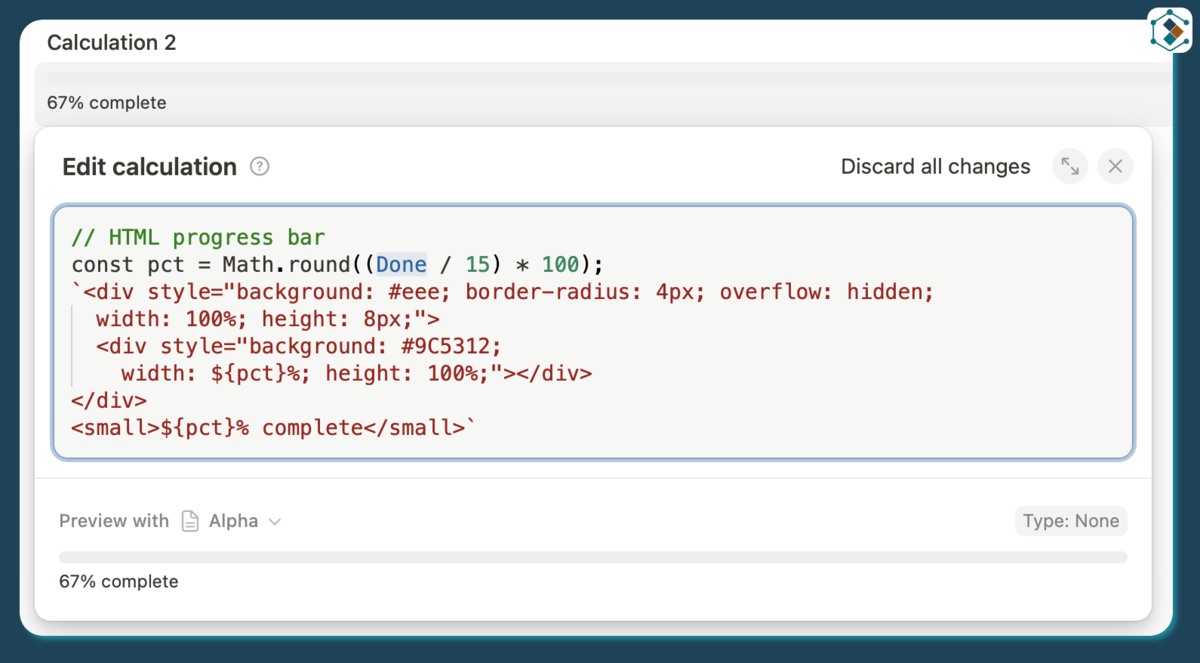
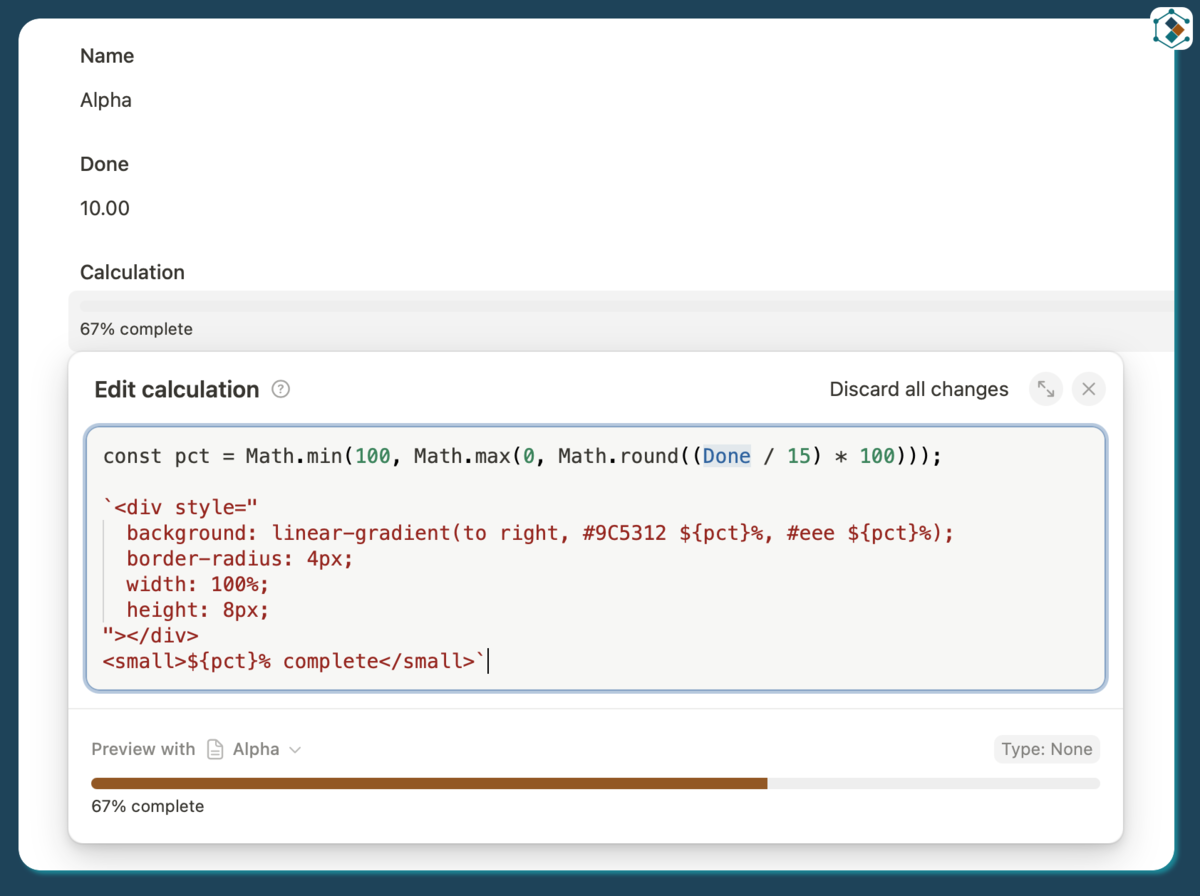
// HTML progress bar
const pct = Math.round((Done / Total) * 100);
`<div style="background: #eee; border-radius: 4px; overflow: hidden;
  width: 100%; height: 8px;">
  <div style="background: var(--tape-color-primary);
    width: ${pct}%; height: 100%;"></div>
</div>
<small>${pct}% complete</small>`
// Conditional row highlight
const overdue = new Date() > Deadline && Status !== "Done"
overdue
  ? `<span style="color: var(--tape-color-danger); font-weight: 600;">
      ⚠ Overdue by ${moment(new Date()).diff(moment(Deadline), 'days')} days
    </span>`
  : `<span>On track</span>`
Components: links & buttons
Special HTML helpers that render with native Tape styling. No custom CSS needed.
Links
Make a clickable link from a URL field. Two ways: Markdown for simple links, <a> tag when you need target="_blank".
Field types: Website [Link]
Output type: Text
// Simplest case — Markdown
`[Open record](${Website[0]})`
// New tab via HTML
`<a href="${Website[0]}" target="_blank">Open record</a>`
Buttons
Render a styled button. Four variants via the type attribute. Wrap in <a> to make it clickable. Buttons themselves can’t run JavaScript.
| Variant | HTML |
|---|---|
| Default | <button>Default</button> |
| Danger | <button type="danger">Delete</button> |
| Outline | <button type="outline">Cancel</button> |
| Outline danger | <button type="outline-danger">Discard</button> |
Field types: Website [Link], Title [Text]
Output type: Text
// Button that opens an external link in a new tab
`<a href="${Website[0]}" target="_blank">
  <button>Open website</button>
</a>`
// Conditional button (only show if there's a link)
Website && Website.length > 0
  ? `<a href="${Website[0]}" target="_blank"><button>Open</button></a>`
  : `<button type="outline">No link</button>`
// Link to a website
`<a href="${Website[0]}" target="_blank">
  <button>Open ${Title}</button>
</a>`
Buttons cannot run JavaScript on click. Wrap them in an
<a>for navigation, or rely on Markdown links.
Collapsible sections
<details> and <summary> are supported. They render as a native expand/collapse control, no JavaScript needed.
Note: Both inline styles and
<style>blocks with CSS selectors work. Tape applies its own default styling to<summary>elements. Your styles are applied on top.
Output type: Text
// Simple collapsible section (no fields needed)
`<details>
  <summary>Show details</summary>
  <p>More information here.</p>
</details>`
Field types: Title [Text], Note [Long text]
Output type: Text
// Dynamic label and content from fields
`<details>
  <summary>${Title}</summary>
  <p>${Note}</p>
</details>`
Field types: Title [Text], Note [Long text], Status [Single select], Description [Long text]
Output type: Text
// Two collapsible sections, each with a styled heading and blue content
`<details>
  <summary style="font-weight: 600; font-size: 15px;">${Title}</summary>
  <p style="color: var(--tape-color-primary);">${Note}</p>
</details>
<details>
  <summary style="font-weight: 600; font-size: 15px;">${Status}</summary>
  <p style="color: var(--tape-color-primary);">${Description}</p>
</details>`
| Approach | Result |
|---|---|
Plain <details> + <summary> tags |
Works |
Inline styles on <summary> or <p> |
Works |
<style>details > summary { ... }</style> |
Works |
<style>details > p { ... }</style> |
Works |
Resources
Found a function or HTML pattern worth adding? Reply below.
- Part 1: Syntax & field references
- Part 2: Functions & HTML output (this post)
- Part 3: Dates, Markdown & recipes
- Part 4: Best practices & troubleshooting