Bug Report:
Summary:
When a relation field is linked to multiple apps, the formula editor’s @ search displays each relation as a numbered suffix (_2, _3, _4) instead of showing which linked app each entry corresponds to. This appears to be related to the linked apps having Cyrillic (non-Latin) names — the system fails to render them and falls back to numeric placeholders.
Steps to Reproduce:
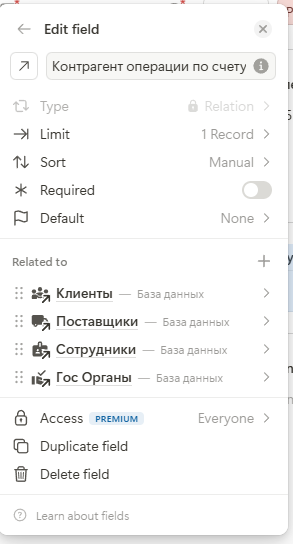
Create multiple apps with Cyrillic names (e.g., “Клиенты”, “Поставщики”, “Сотрудники”, “Гос Органы”).
Create a relation field that links to all 4 apps.
Open the formula/calculation editor.
Use @ to search for the relation field.
Expected Behavior:
Each relation entry should display the actual app name, e.g.:
_Counterparty_of_the_account_transaction → Клиенты
_Counterparty_of_the_account_transaction → Поставщики
_Counterparty_of_the_account_transaction → Сотрудники
_Counterparty_of_the_account_transaction → Гос Органы
Actual Behavior:
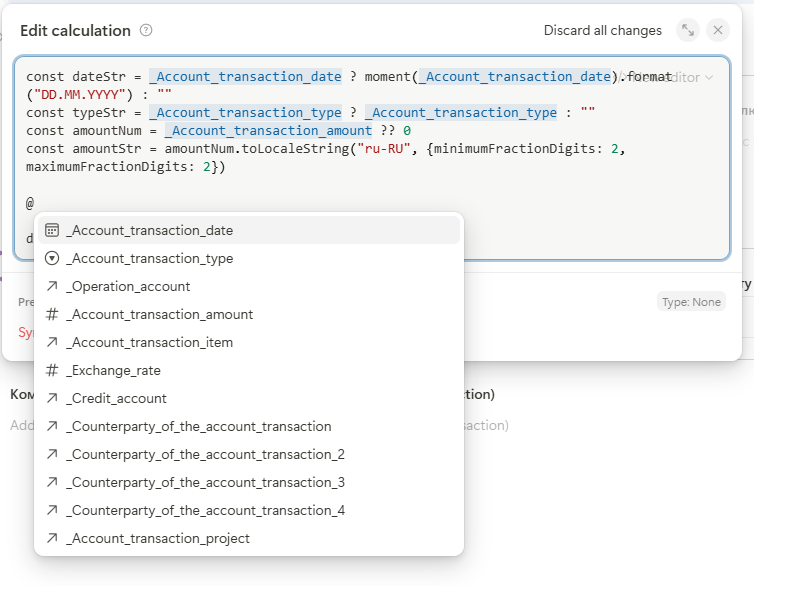
The dropdown shows only:
_Counterparty_of_the_account_transaction
_Counterparty_of_the_account_transaction_2
_Counterparty_of_the_account_transaction_3
_Counterparty_of_the_account_transaction_4
There is no mapping to the actual Cyrillic app names. Users must guess or memorize that _2 = Поставщики, _3 = Сотрудники, _4 = Гос Органы.
Hypothesis:
This issue is likely caused by the editor being unable to properly handle or display non-Latin (Cyrillic) characters for linked app names in the formula autocomplete, similar to how Cyrillic field names are replaced by field IDs (e.g., _7). The system appears to fall back to numeric indices when it cannot render the original name.
Impact:
Makes it impossible to reliably select the correct relation in formulas without trial and error. Forces users to maintain English duplicates of app names just to make the editor usable.