I expect it would make peoples lives easier if there was the option in searches and view filters to do so by years as well as the current days, weeks and months, however an option:
Tape stores the dates in a number of strings so you can match on the year using a JSONata $subString and $count as you go outputting a new object (you could build the whole HTML report in JSONata if you wanted) this will give you the 0 as well:
const ev = `{
"2023": $count($[fields[field_id=334593].values[0].start_date_utc ~> $substring(0, 4) = "2023"]),
"2024": $count($[fields[field_id=334593].values[0].start_date_utc ~> $substring(0, 4) = "2024"]),
"2025": $count($[fields[field_id=334593].values[0].start_date_utc ~> $substring(0, 4) = "2025"]),
"2026": $count($[fields[field_id=334593].values[0].start_date_utc ~> $substring(0, 4) = "2026"]),
"2027": $count($[fields[field_id=334593].values[0].start_date_utc ~> $substring(0, 4) = "2027"])
}`;

const res = jsonata(ev).evaluate(record_collection_my_emails_24);
console.info(JSON.stringify(res));
The result:
[09:31:04.343] {"2023":0,"2024":371,"2025":628,"2026":1,"2027":0}
What I originally wrote
I originally wrote the following but I believe I completely missed what you were asking, I am leaving it in as someone may still find it useful
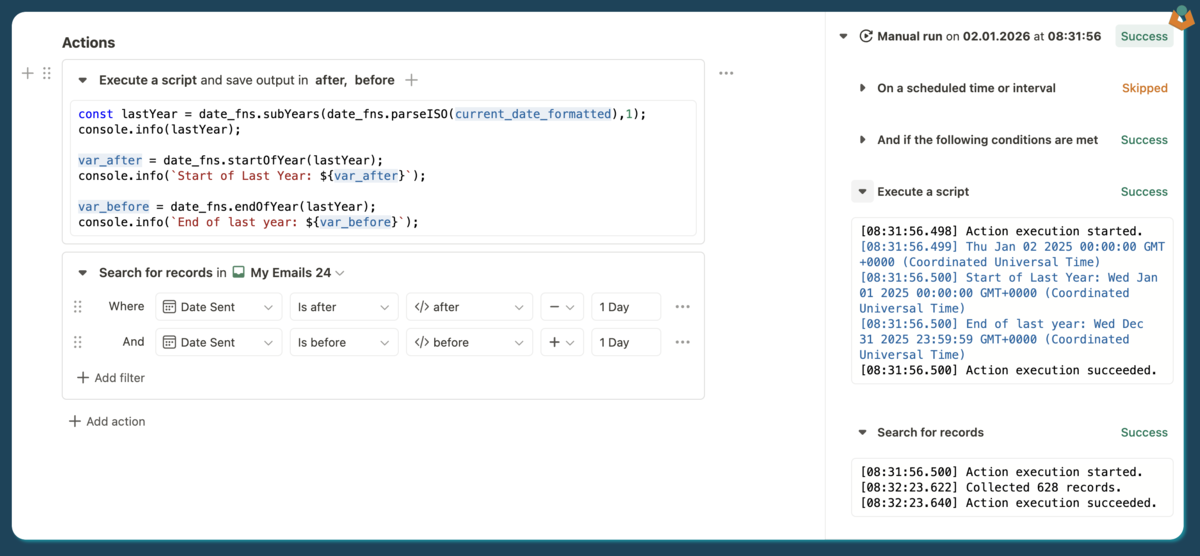
If you are trying to build a collection of last years records to generate a PDF report or similar then you can do:
// You can subtract however many years you want from the current date
const lastYear = date_fns.subYears(date_fns.parseISO(current_date_formatted),1);
console.info(lastYear);

//Then you can find the start date for your year
var_after = date_fns.startOfYear(lastYear);
console.info(`Start of Last Year: ${var_after}`);

//and then the end of your year
var_before = date_fns.endOfYear(lastYear);
console.info(`End of last year: ${var_before}`);
With this you can then search your records:
This means that as long as a date is on the record somewhere you can filter but any year you like without adding calculation fields.
The view’s also can group buy year:
However if you want a full ‘view’ for a year then yes I believe the easiest way is to have a calculation field formatting the dates year.