Hi Tape Community,
this is my first question here, and I’m excited to get some bright minds to look at my issue.
Current state:
We have two automations that trigger the creation of a customer profile, both based on a webhook connection to our website.
Problem:
The automations are triggered either by filling out contact information or by using a calculation service on our site. Often, users do both, which leads to duplicate customer profiles.
Goal:
I want to extend the filters in the automation so that, if the email address already exists in our customer database, the creation of a new profile is prevented.
My struggle:
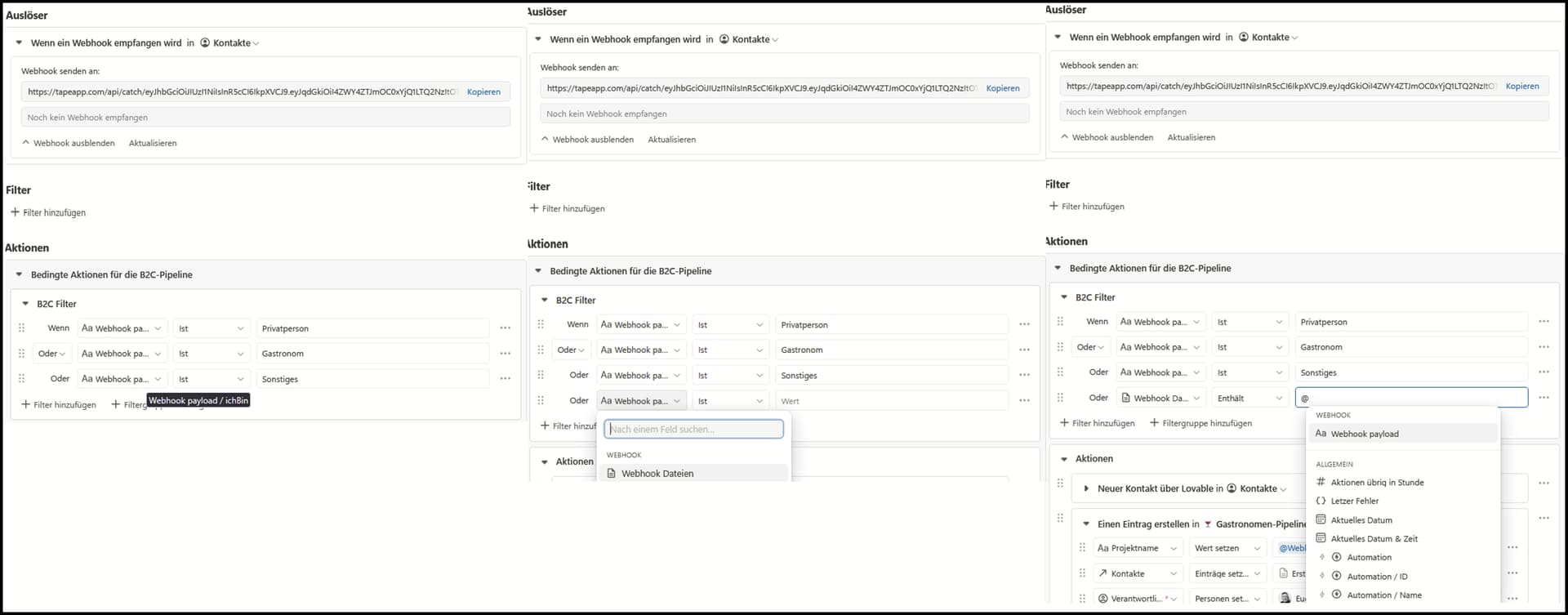
Unfortunately, I don’t have much flexibility when choosing fields for filters and conditions.
In the screenshot below, you can see that the field “Webhook payload / ichBin” was selected in a previous step:
Because of this, my available options are now limited to either the same field or generic webhook data.
I don’t have the option to manually reference something like “Webhook payload / email”, even though this field does exist.
Additionally, these are the only options available for the reference field:
What I would like to do:
I want to reference the field “Webhook payload / email” and check it using “does not include” against a field that contains all existing email addresses (as a list/vector).
Is this possible? Or am I approaching this the wrong way?
Thanks a lot for your help in advance!
Best regards,
Leonard