We’ve had several experiences where layout configurations were changed in an app using the new record layout, but those edits were not saved properly.
It seems that some field labels/config changes are intermittently not sticking,
The most common issue is with field names and field labels changing.
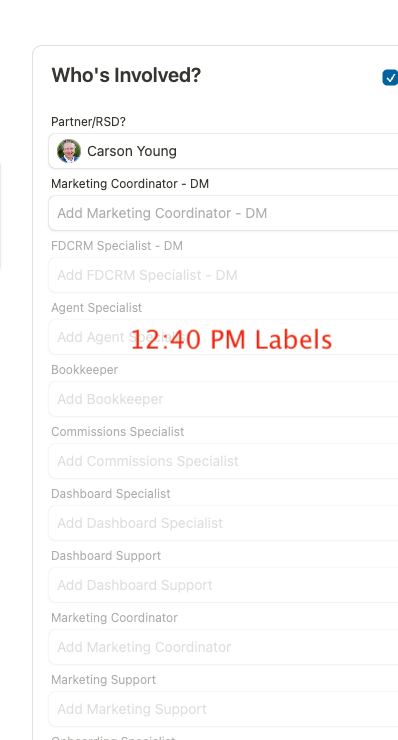
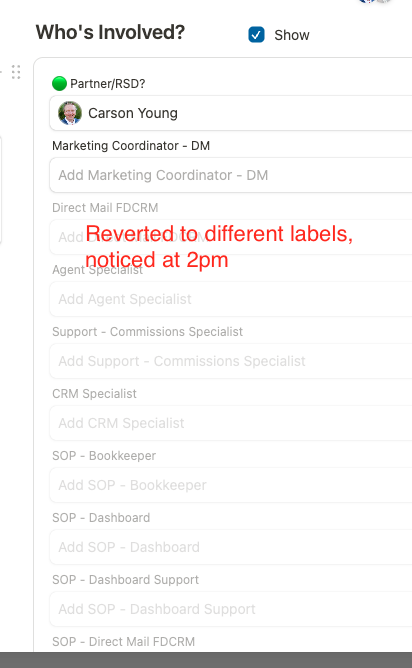
Sometimes it’s odd because the changes appear to work temporarily. We’ve even built automations and we could see the updated field names in the automation choices. But then later on (hours or days later) the changes had reverted back and multiple toggle fields showed the same cloned field name making it impossible to differentiate one from the others.
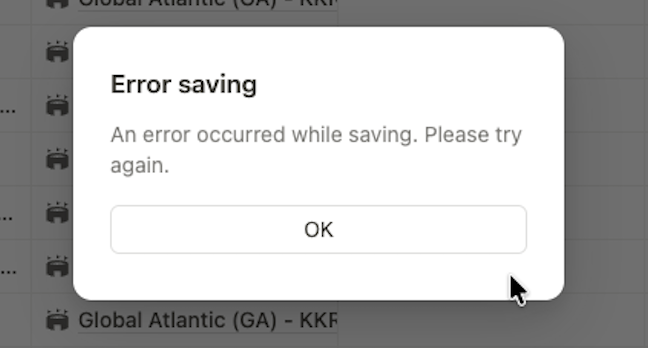
Recently we saw this error message pop up:
This short video details some examples of what we have seen:
We have tried to be extra careful to not have more than one user in an unlocked edit mode for any given app at a time.
@Leo can you share any details on what is an expected outcome if two people have an app unlocked at the same time?
Lets say that two users both have the same app opened in an unlocked state at the same time.
Imagine that user one makes edits, locks it, but then user two makes different changes and locks their instance of that app shortly after. Would we expect changes from user one to be overwritten or reverted back when user two hits the lock button?
Is there a way to see or know if another user has an app in an unlocked state?
@Leo we’ve noticed more examples today of field names reverting back to previous values even though they had saved at one point for us. Hoping to get more clarity on what might be causing this issue.
thank you very much for sharing this and for recording the video. I watched it carefully, and it is really helpful for us
From what I can see, there are likely a few things mixed together here.
First, the “Error saving” message usually appears when a save operation would create an inconsistent canvas state. In that case, Tape intentionally blocks the save instead of writing an invalid configuration. This is part of the protection we have built into the system. If this happens again, it would be extremely helpful if you could send us the browser console error. That usually gives us the exact technical reason, so we can fix the root cause very quickly.
Regarding field names and labels: when sync is enabled, field labels are designed to sync reliably. We have invested a lot into the underlying client and server state handling, and the technical foundation here is very strong. There can still be rare edge cases in very complex editing situations, and reports like yours help us identify and remove those one by one.
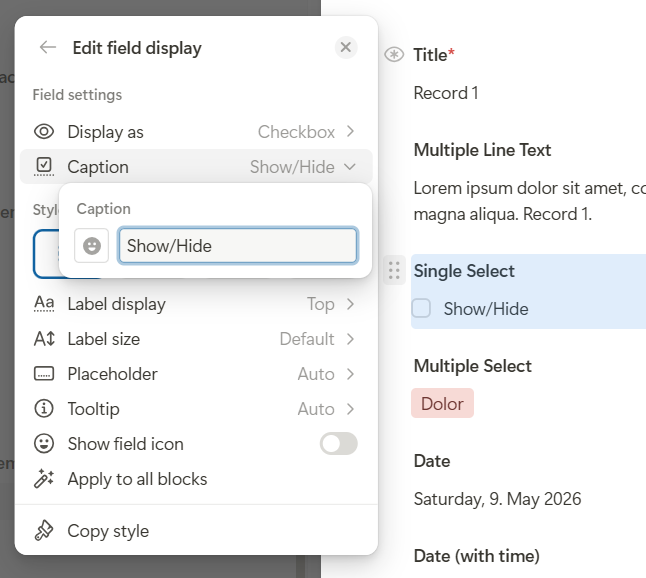
In the example from your video, I think one part may actually be a misunderstanding between the field title and the caption. It looks like you are using a checkbox-style display for a single select or status field. The text directly next to the checkbox is the caption, which is a separate style setting. It is not the actual field title. Because of that, it is also handled separately and does not behave exactly like the synced field label.
About multiple users editing an unlocked app at the same time: The new record is built for collaborative admin work. Changes are handled through live transactions, not as one big save at the end that simply overwrites someone else’s work. So the technical foundation is already designed for parallel editing.
Live avatars already work today when two users unlock the same record from the same app because in that case they are actually present on the same record. The more complex conceptual part is how to show this clearly when users are editing the same app structure from different records or even different layouts. Technically, the foundations are already in place and the live avatar logic works. We are now refining the experience around unlocked editing so it becomes even clearer who is editing what.
Thanks again for the detailed report. This kind of feedback is very valuable for us and helps us make an already powerful system even smoother and clearer.
Thanks as always @Leo for such a clear and helpful response.
I’m very happy to understand how the technical foundation for live parallel editing is set up. Being able to rule that out as something that we may have been causing with user error is good.
We will pay attention to any future errors with this and try to share the browser console error message for reference.
As you stated, with the difference between the title and the caption, I don’t think that was the issue in this case. We actually started using the captions after noticing this issue. It was an attempt to see if a similar text label on multiple captions while keeping different field titles would alleviate this issue, and that’s where we started getting into the caption piece. We will pay close attention to that and make sure it’s unrelated to that.
@Leo we’ve had multiple times today (like at least six separate incidents) when we added field names (always with the Sync field value selected) and the names later dissapear.
The name does save, we see it there for awhile, but when we come back later, it is gone and causes issues and extra work.
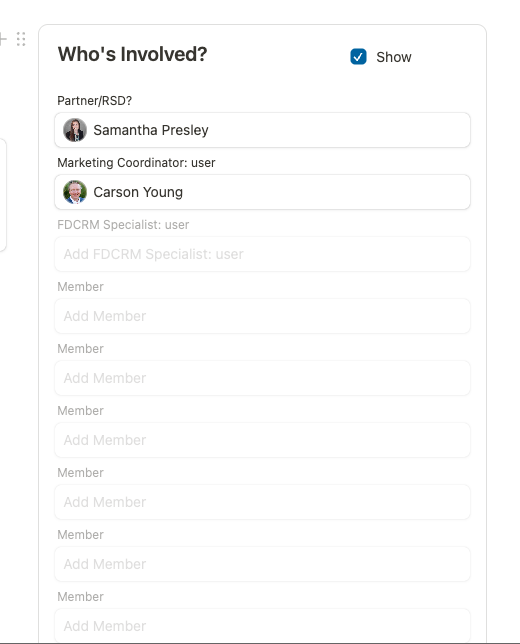
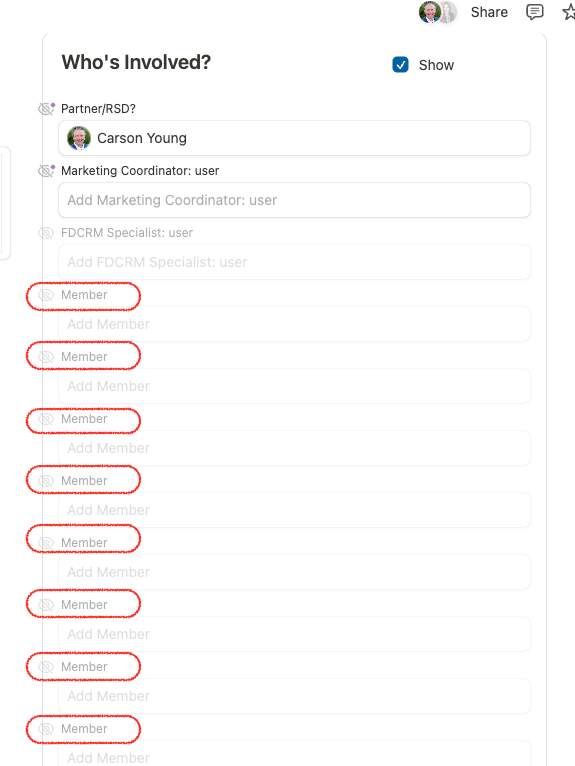
And this screenshot also shows another spot where there’s a fairly long list in a complicated project with many different Job Roles involved. Each of the member fields shown was set up originally with an exact Job title, and an automation built to look up who’s in that particular role and add their user as a member in these fields. But now all the job role titles are gone and each one just says Member.
We have to go back and try to find screenshots or lists of what order each one was, because if we just add roles back in but in a different order, the automations will now be placing incorrect names in those fields.
It’s a big issue when we keep losing field names like this.
@Leo - sorry to spam, but we just found even more examples of this error. It’s becoming extremely frustrating while building in Tape.
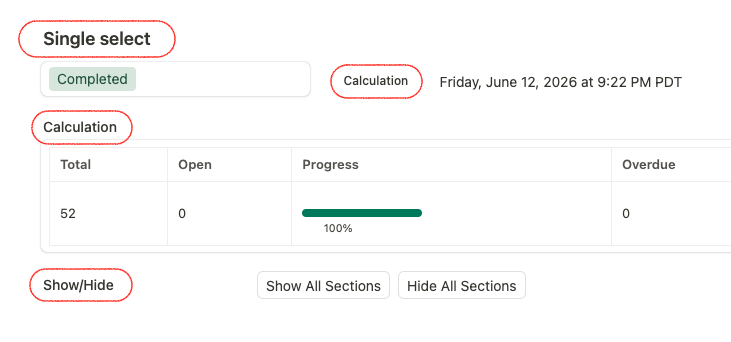
All the highlighted fields are spots that 100% had field names added (and worked fine for most of the past week) and suddenly they are all reverting back to their unnamed field type values instead of the unique field name we need them to display.
@Leo - additional example here. We’ve suffered again where multiple fields HAD a distinct label, but LOST that label.
This seems to happen more when we edit the field names inline on the page rather than opening the field settings and explicitly editing the field title.
this issue is causing a big amount of re-work to check and fix labels. And some workflows are appearing broken because we chose the wrong option when moving fast and the correct label had gone missing.
woah. now in the last two hours, after manually fixing the labels, I left, came back after a meeting, and did a hard refresh and they had all reverted back to an earlier label!
Not sure what’s going on here @Leo
I took this screenshot just to reference/show what it had when I left that task, just in case it changed again.
thank you very much for the detailed reports and for continuing to document these cases
We are already working on this. Based on the different reports, we were indeed able to identify a sync issue around field labels. This logic is quite complex because it involves inline editing, undo/redo, server sync, and the “Sync field value” on/off behavior. We have now made a larger optimization in this area, which should eliminate these issues. We plan to roll this out in the coming days.
I will let you know once this has been released.
Regarding the other reports around the block document / saving errors: we have also been fixing these continuously, and they should gradually disappear. In some cases, these can be triggered by very specific editing operations, so if you still run into one, it would be super helpful if you could share the exact timestamp together with the screenshot. With the time, we can usually verify it directly in our error logging and analyze the specific operation that caused it.
Thanks again for all the reports and for the detailed examples. Really appreciated.
Great news: last week, we rolled out the comprehensive optimization to the title sync and also tested it thoroughly. Based on our current findings, we believe the gaps that caused these sync issues have now been closed
Since we were never able to reproduce the issue reliably, we cannot completely rule out that there may still be another edge case somewhere. However, we identified two gaps in the code that we strongly believe were responsible for the behavior, and both have now been fixed.
We therefore expect that the issue should no longer occur. However, should you notice another case, we would be very grateful for another report. We would then investigate it again and try to establish a reliable reproduction path.
Thank you both again for your detailed reports and continued support!