
The app itself can still load, but the related form can’t be accessed anymore (content is “not-found”).
Something seems broken?
1 Like
Hi @dirk_s,
thanks a lot for reaching out and for the detailed report, really appreciated!
Could you please share a bit more detail on your setup and the exact steps? From our side, we have not made any changes in this area recently, as the team has been fully focused on the new calculation field. So everything here should still behave as expected.
From your screenshot, you are in the sharing menu of the database app. This setting controls access in the following way: if a specific record from the app is shared with a user, they can access the app and see that content, for example in a table view, not only in the shared space. So this setting is about access via shared records.
Forms work a bit differently. They have their own permission settings where you define who can access the form and what they can do with submitted entries.
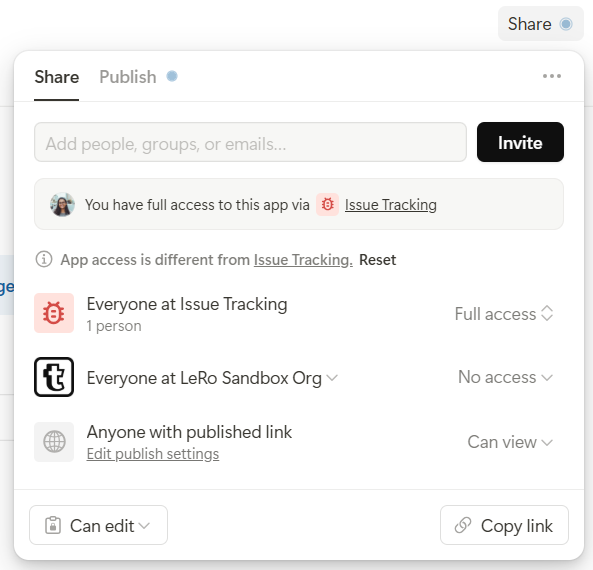
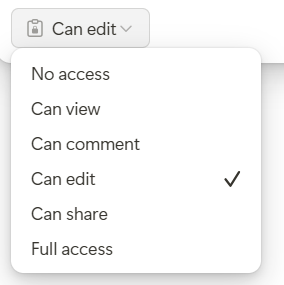
If the form is used internally within your organization, users need to be explicitly added to the form to be able to open and submit it.
Could it be that this step is currently missing in your setup?
I am adding two screenshots for clarity
one showing the form sharing settings
and one showing the form submission access settings
Happy to take a closer look together if needed 
Best regards
Leo
Hi Leo,
thanks for the quick response.
The users are not members of the workspace - they only get access to shared records. We added the forms in order to allow them to add new records to the apps, they have only access on shared records.
That is the setup:
Strange now, that it was working before - but now people get the not-found (404?) in the URL.
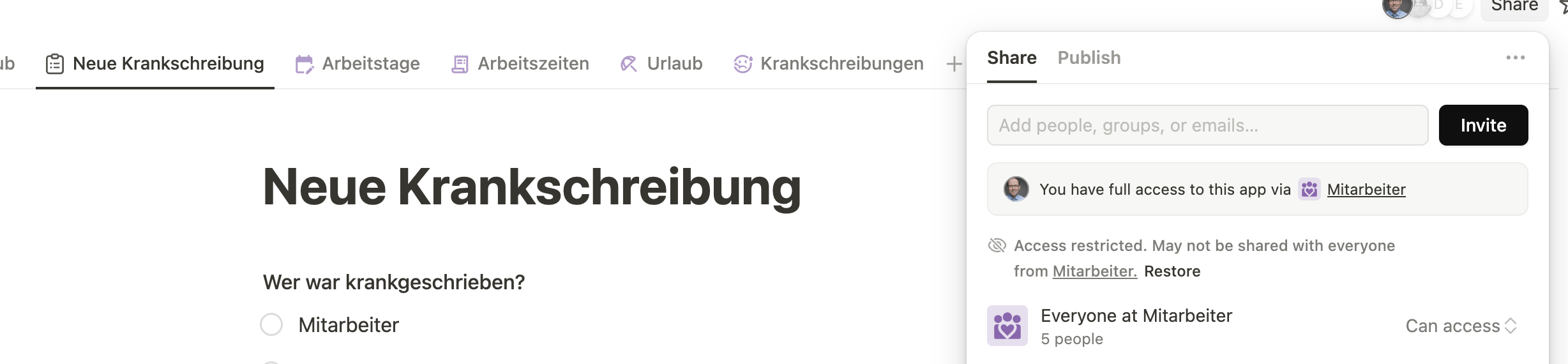
Actually - do you see the message “Access restricted. May not be shared with everyone…”? After I clicked “restore” it worked again.
What happened here?
1 Like
@dirk_s - we have experienced that before.
The setting appears to be correct, but users are unable to see what was supposedly shared with them.
But after opening the setting, making a change, then changing back, it works!
Very confusing why the same exact initial and end setting cause different behavior. But it certainly needs to be toggled in some circumstances before it works properly.
I’ve documented that forced toggle situation back on this comment a few weeks ago: [✅ Solution] Question on sharing visibility to related items for guest users - #4 by CarsonRedCliffLabs
hopefully enough recorded use cases help identify the issue so it can get fixed.
2 Likes
Again today people can’t see the forms I was able to “fix” access yesterday. Something clearly seems to be broken @Leo
1 Like
Hi @dirk_s and @CarsonRedCliffLabs,
thank you again for the additional insights.
From everything you are describing, this definitely appears to be a reproducible issue that we have not yet been able to fully isolate on our side.
We are currently investigating this in detail and are prioritizing finding the underlying cause as quickly as possible. One of the challenges at the moment is that the issue seems to occur regularly, but still somewhat sporadically, which makes it difficult to consistently reproduce internally.
What would help us tremendously is the following. If the issue appears again, please send me a direct message with a screenshot of the browser console messages tab together with the exact local timestamp of when the issue occurred. With that information we can directly correlate the event with our internal logs and hopefully identify what is causing the inconsistent sharing behavior.
I will share an update here as soon as we have identified more details or have a fix available.
Thanks again for your support.
Best,
Leo
2 Likes
Hi Leo,
we didn’t change anything - so the situation is still “broken” if you like to have a view into the situation. I will let my team colleague to send you the requested information.
1 Like
Great, thank you @dirk_s,
That really helps us to understand the issue properly and fix it quickly and sustainably.
And again, sorry for the trouble.
Best,
Leo
Hey Leo,
We got this in the console:
installHook.js:1 ERROR f: [subscribeToBlabItemDataV2] Actor of type USER with id 144802 has invalid permission to access blabItem 172438195!
    at S.selector (main.0a5b5fd4e1f52866.js:1:906364)
    at S.error (vendor.626584302b3813c1.js:143:242254)
    at C._error (polyfills.040d76f1a95beede.js:1:9111)
    at C.error (polyfills.040d76f1a95beede.js:1:8908)
    at W._error (polyfills.040d76f1a95beede.js:1:9111)
    at W.error (polyfills.040d76f1a95beede.js:1:8908)
    at w.observe (vendor.626584302b3813c1.js:143:217514)
    at a.dispatch (vendor.626584302b3813c1.js:143:251926)
    at a._execute (vendor.626584302b3813c1.js:143:266150)
    at a.execute (vendor.626584302b3813c1.js:143:269347)
Hope this helps
Best,
Eric
1 Like
Hi @Eric_Scherlich,
Thank you so much for the details. This is really helpful!
With this information, we can definitely get to the root of the issue, identify what is causing it, and solve it quickly. We’ll get back to you as soon as we have a fix.
And thank you again for your support.
Best,
Leo
Hi @Eric_Scherlich, @dirk_s and @CarsonRedCliffLabs,
Thank you again for your amazing support 
And especially thank you @Eric_Scherlich for sharing the console message. With that information, we were able to clearly identify and fix the issue.
It was indeed a problem in a specific permission situation. The issue is now fixed. We have already tested it. After a refresh, it should work as expected.
I will close this issue now and set it to Done. If anything still does not work as expected, just write to me here and I will reopen it.
Best regards,
Leo
3 Likes