Hi, I wanted to ask if it is possible to create a QR code in a record in 2026 in New Recor Experience based on a URL address created based on variables and save it as a File. I would then like to insert this QR code in graphic form into the generated PDF.
If I understand correctly, those two links should let you build a dynamic link, turn it into a QR code, and then add it to whatever you need. I have not tested with the new record but I imagine the same foundation applies.
Thank you. I saw these topics and I’m not sure. Tried it and it didn’t work for me. Maybe I’m wrong at understanding or the process changed with New Record Experience.
App 1 / App 2 - I don’t know if I understood it correctly. I would simply have a link created by automation in the “URL” field of the record. And from this URL I would like to create a QR code in the same record, ideally in PNG, and save it as a file in the same record.
Hi @Samuel222, if I get it correctly I will try to explain it…
At this post look at last comment from Jason.
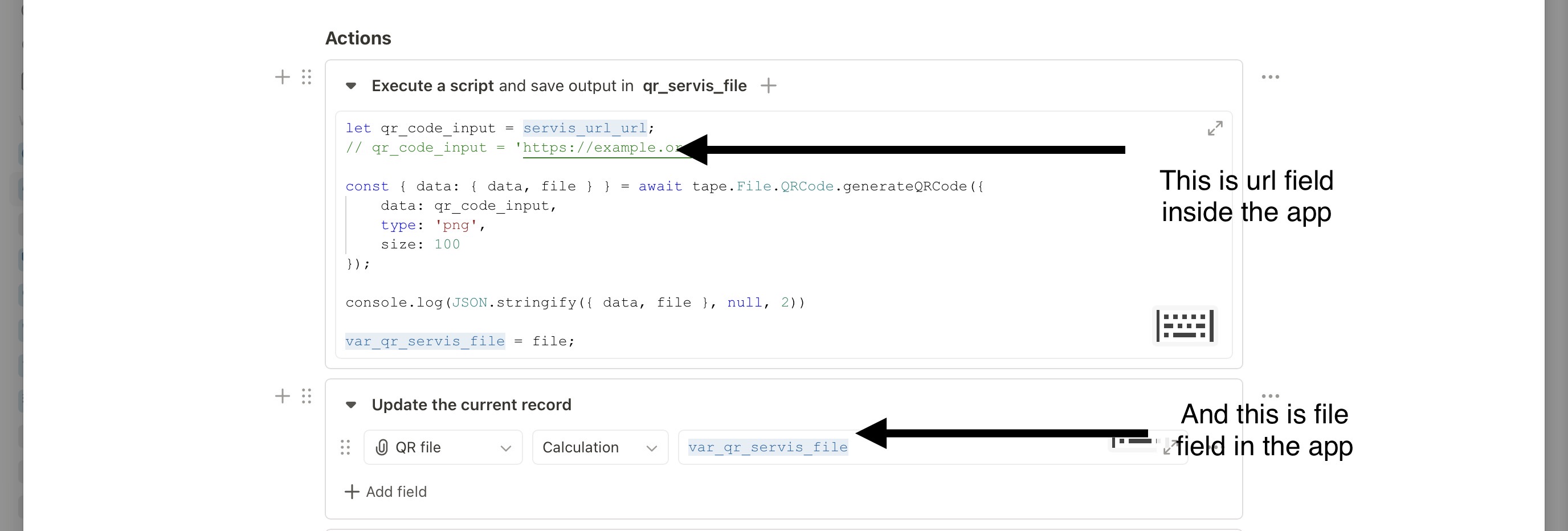
In app you have to use file field and url field.
Then in automation use script block and use these two fields to populate url and file.
Thank you, @tomaz. I don’t know if I’m doing something wrong… I have Link field in older version of Tape, but I am using New Record Experience and in this NRE the Link field is not visible. So I don’t know how to create it.
Maybe if I can hire someone who can help me with this directly in my Tape account, I will appreciate it.
So as far as I know, new layout doesn’t have url fields yet so in mean time just change it to normal text field one line of course and populate it in 1st automation on create with record url and then follow previous post.