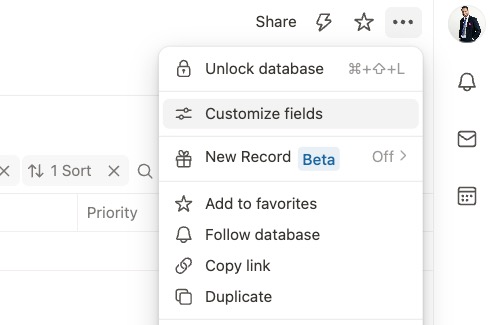
Would it be possible to bring back the “Customize fields” option in the top-right menu?
Currently, you open an existing record to edit/add new fields, which works fantastically.
The thing is, after using Tape for almost 3 years, I got used to clicking the “customized field” option in the top-right menu to add/edit fields in records. If it is not too much work, it would be nice to have it again, editing a “dummy/empty” record that updates all others.
thank you so much for your feedback, this is really valuable for us
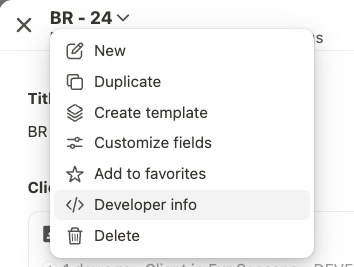
I understand your points about bringing back “Customize fields” in the top-right menu, and also the need for “Developer info” on a per-record level, especially for API work.
We’ll review both topics, check how they fit into the current “New Record” experience, and come back to you once we have a clearer direction and timeline.
Thank you so much for sharing these insights from your side
We’ll definitely take this into account for the next iteration toward the final release.
When we built the new record frame, we focused on getting into the fields fairly quickly, because releasing the full field scope is still a bigger blocker for many users and partners.
But we’ll definitely revisit these points and try to bring the most important developer workflows back in a thoughtful way.
Thanks again for the insights. It really helps us understand what was valuable, what was used a lot, and especially what our power users are genuinely missing!
Great feature request. We’ve now released Customize record layout
The new central cockpit for building and managing record layouts.
Hope this helps, and thanks for helping us make Tape better.