I am quite new to TapeApp, and very very enthusiastic about the features, the look&feel, the ease with which I can maintain the data structure and the data itself.
For the business of a friend, I have made a small workspace with 5 tables. It all looks very promising.
Before I expand the workspace with all the necessary tables and functions, I must be sure that she can use this in real life business. My biggest question is about data security. Is it possible to create daily backups of the data, and - in case of emergency - to restore a backup?
Thanks anyone for taking the time to respond to my question.
welcome @Erik_Mathlener - I promise you will start to love Tape even more as you use it and uncover all of it’s capabilities!
Tape makes it very easy to backup data using API connections, or basic excel/csv exports and imports.
At this moment, I am not aware of a third party backup tool available off the shelf. You can see this thread from the community where there was chatter about this last year: 🆕 Launch Pro Backup for Tape ✨
There was a ‘Pro Backup for Tape’ but it was retired due to lack of demand. As @Leo noted in the final comment in that thread, there wasn’t strong demand because Tape was reliable and easy enough to solve backup requirements with other diy approaches.
Thanks for welcoming me. And indeed, I am more and more enthousiastic about all the features.
It is great to read that Tape is convinced about the reliability and security of the data storage. Nevertheless, sometimes users make mistakes (or admins do) which leads to lost or damaged data. My friend has been working with her business administration in Excel for years. Now it is time to move to a better system, but I am not sure whether she can live with having no backup at all. Knowing that there is a copy of the vital data makes the mind at ease too.
So, what are my options here? For instance in automations: copying the table contents to a file? I read that the Javascript is running on the server, so that may be an idea. Would it work?
Or go extreme: just make a daily copy of the entire workspace. A cron job would be perfect: delete the existing backup copy, and make a fresh copy.
Depending on exactly what you want to back up, and how much data there is, there are quite a few approaches available. These range from manually duplicating a workspace, through to automatically syncing records into an external database. You could also serialise records into JSON or text files and store them in cloud storage if that better fits your idea of a backup strategy.
You also have access to record revisions, which means previous versions of records can be retrieved. These are available both in Automations and via the API.
Of your two suggestions, the first is probably the more practical. For example, you could run an automation every night that collects records changed during the day and then:
writes them into a Google Sheet
stores them in an external database
generates JSON backup files and uploads them to cloud storage
Your second suggestion is not really possible directly, as there is no built-in way to automate full workspace duplication. Technically you could build an external tool to recreate a workspace structure, but if you are going that far there are generally better backup approaches available.
If your concern is accidental user mistakes, and you can rely on users noticing and reporting mistakes quickly, then learning how to restore record revisions is probably the most practical solution. In my experience though, users often do not realise mistakes immediately, which makes revision-based recovery less reliable as a sole strategy.
If your concern is protection against losing access to data in Tape itself, then you really need to get the data into an external destination continuously or near real-time.
This very old post shows one way of syncing Tape data into MongoDB:
And this one discusses extracting changed records, converting them into JSON, and uploading them into vector storage for AI use, although the same principles can absolutely be used for backup/synchronisation purposes:
I also recorded this video for a friend which demonstrates an external tool that:
configures application webhooks in a Tape app
backfills an external database
keeps the database updated as records change in Tape
It was not built specifically for backup purposes, but the same architecture could easily be adapted for that:
Basically, I would approach this like any other backup problem. The important thing is defining:
what data actually needs protecting
how likely data loss is
the cost of losing that data
the cost of maintaining backups
and importantly, the cost and practicality of restoring from those backups
That last point is often the one people forget. Happy to talk through options in more detail and then if you pick a route we could maybe put a showcase together to help others.
Thank you very much, Jason. For now, I want a simple solution. Maybe I will go for a more advanced solution later in time. That would make it necessary for me to study API’s and experiment with them. At the moment that is too time consuming. It is good to know that there are possibilities to do so. Copying (changed) records to another storage is one thing, having a fool safe method to restore them is even more difficult, I suppose. So, it is not created and implemented an a sunday afternoon.
For now, the users have the restore-from-trash option. I agree that most times, people are not aware of the mistake until it is too late. Having said that, it is what it is.
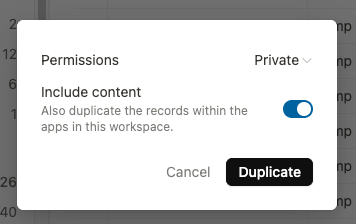
I will show the supervisor how to duplicate a workspace as a backup (and to delete old backups as it is not desired to have dozens of backups cluttering the data storage). Fortunately the workspace will be small. Of course, the danger is that the supervisor might forget to make a backup regularly…
Restoring a workspace seems quit simple: move all user activity to the backed up workspace and archive (or delete) the one that got damaged.
All and all I think this backup method will ease the mind.
One word of caution if you choose to use the pathway of duplicating a workspace with all data as an easy backup solution
this duplication DOES include workflow automations, so be aware of how that will impact your data.
In the past, we duplicated workspaces with thousands of records, but failed to realize and turn off automations that were embedded in the apps with those records. Some time based flows (with trigger rules such as run everyday at 2am, or run every friday afternoon) started triggering automations that were never intended to run. We were confused when we saw throttling occur on our live workspace automations.
It took some digging (and hard lessons) before we realized that we did NOT want any active workflows in the apps that had been duplicated merely for backup purposes.