This is a big one. You can now share individual Tape records with anyone and let them view, comment, or edit, without ever creating a Tape account.
Share a record with a client, collect feedback from a partner, or collaborate with people outside your organization. All in real time, with just a link.
And the best part? Published records are fully responsive, designed to look great and work seamlessly on desktop, tablet, and mobile.
 Publish a record
It only takes a few clicks:
- Open any record and click
Share, and select thePublishtab. - Click
Publishand copy the link. - Under
Share➜Anyone on the web with link, choose what visitors can do:- Can view: View the record.
- Can comment: View and leave comments.
- Can edit: View the record, comment on it, and edit it.
You can also:
- Embed records on other websites.
- Allow duplication so others can use your record as a template.
- Remove Tape branding with Premium, at no additional cost.
- Change permissions or unpublish whenever you want.
 Meet Visitors
Alongside Members, Groups, and Guests, there are now Visitors.
Anyone with the link can collaborate on a published record, depending on its sharing permissions. No invitation, signup, or login required.
Each visitor gets a friendly, automatically generated name, like Visiting Maker or Visiting Optimist. Their edits, comments, and reactions appear in the activity history.
And with live avatars, you can see who’s viewing or editing the record and even which field they’re working on. Real-time collaboration, now beyond your Tape organization.
 Choose what visitors see
Not everything in a record needs to be visible to everyone. For example, you can share a property with a client while keeping internal notes and calculations out of their view. One record, different views for your team and external visitors.
With Rules, you can show or hide individual blocks, including fields, text, and images, based on who’s viewing the record. Simply add a Rule to any block, select Current user ➜ Is any of ➜ Visitors, and choose Show block or Hide block.
If you also want to hide a field’s activity from visitors, use Field Access to restrict access for Visitors.
 A few ways to use it
- Client feedback: Share a project or design with a client and let them leave feedback directly on the record.
- Property reviews: Let property owners review listing details, verify information, and suggest corrections.
- Support tickets: Let customers track the status of their reported issues, add comments, and provide additional information.
No accounts to create. No invitations to manage. Just share a link and collaborate.
 Try it yourself: Edit a published record
Want to see what it’s like to collaborate as a visitor? Try it yourself, no Tape account needed.
- Click here to open the live demo record
- Go to the
Try it outtab. - Change field values, leave a comment, or explore related vendors.
Your changes appear in real time. No signup or login required.
 More value, included in your plan
With record publishing, we’re adding a whole new way to collaborate with people outside your organization.
Publish as many records as you want. Viewing is unlimited on every plan. Visitor activities (edits, comments, reactions, and replies) are a Premium feature, with trial activities included on Free and Plus so you can try it out.
| Plan | What’s included |
|---|---|
| Free | Unlimited viewing + 10 trial visitor activities per organization / billing month |
| Plus | Unlimited viewing + 10 trial visitor activities per organization / billing month |
| Premium | Unlimited viewing + 25 visitor activities per billed member / billing month |
| Enterprise | Unlimited viewing + custom visitor activities |
For example, an organization with 10 billed Premium members gets 250 included visitor activities every billing month. Included activities reset each billing month, even with an annual subscription.
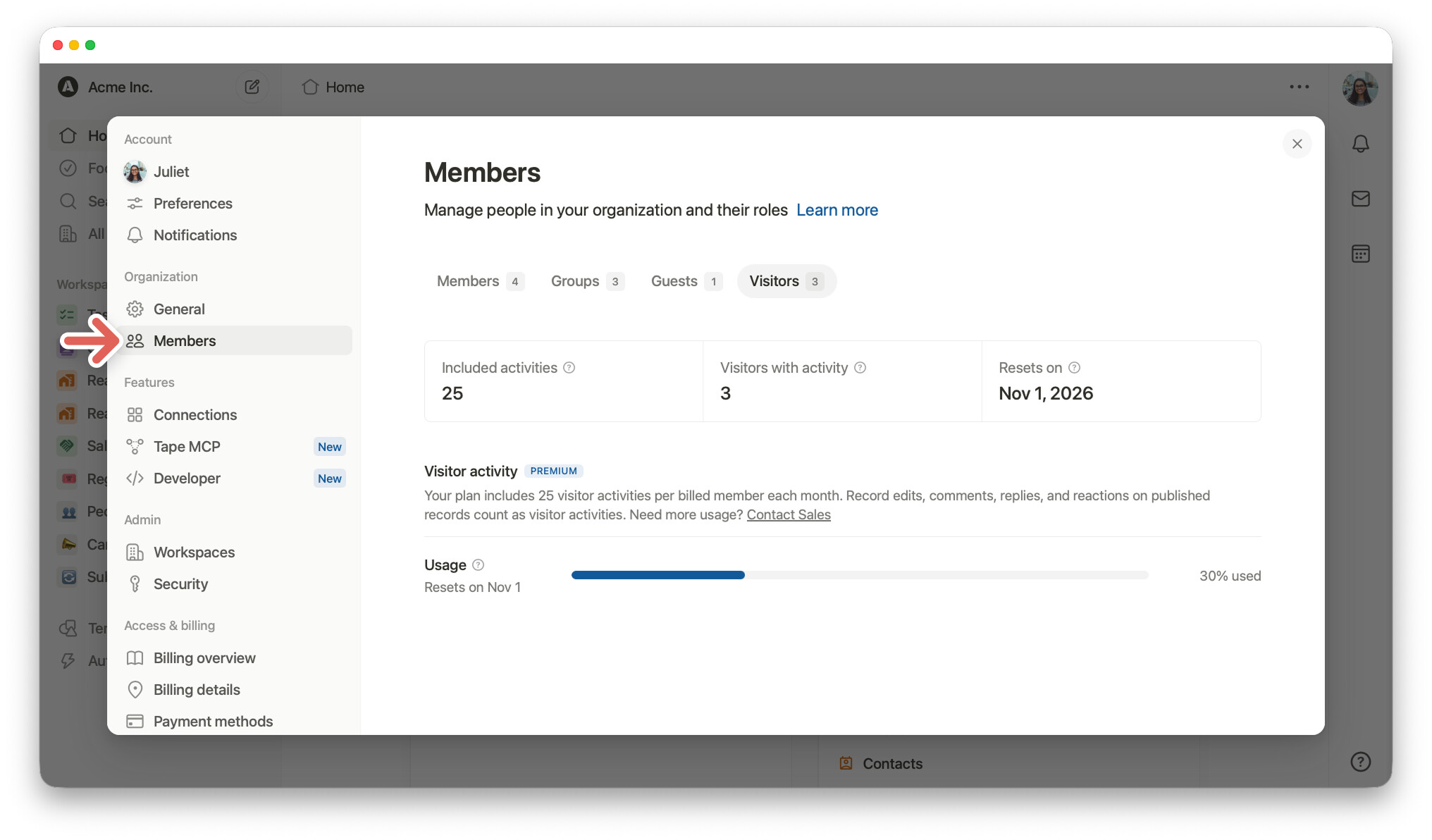
To see your included activities, usage, and next reset date, go to your organization name ➜
Settings ➜ Members ➜ Visitors.
Our goal is to make external collaboration easier while keeping Tape fair and sustainable for everyone. We’re starting with this model and will learn from how it’s used. Visitors are designed for simple, account-free interactions. For workflows where knowing who took an action matters, Guests and Members remain the better choice.
 When accountability matters
Visitors don’t need to sign in, so their identities cannot be verified.
For workflows where you need to know who made a change or gave an approval, such as financial approvals or other important decisions, we recommend inviting people as Guests or Members instead.
This way, their actions are linked to their signed-in Tape accounts, giving you a clear record of who did what.
 Publish entire apps, too
You can also publish Database, Dashboard, and Form apps to the web.
- Database apps: Visitors can view your published database. You can also allow them to open all displayed records in read-only mode.
- Dashboard apps: Visitors can view your published dashboards.
- Form apps: Anyone with the link can fill out and submit a form.
All without a Tape account.
Your records are no longer limited to your organization. Share them with anyone and collaborate in real time from any device.
Happy building.