YES! this is massive. Thank you guys so much for the incredibly amazing and hard work to make this possible.
Only problem is that now my entire day is shot because I will be playing with this all day…
YES! this is massive. Thank you guys so much for the incredibly amazing and hard work to make this possible.
Only problem is that now my entire day is shot because I will be playing with this all day…
Thank you so much, this really means a lot to us 
The past months have been quite a ride. This was definitely our “end boss,” and we’re really happy to get it into your hands early. There are still a few things we’ll polish over the next days, and with all the moving parts around relations, some smaller issues might still pop up.
Thanks a lot for your patience, and really excited to see what you build with it!
Best,
Leo
You know something amazing is happening when the intro video is over three minutes long.
This just changed a decade old structure for all of us old hats.
Also, I would like for it to be known that this new feature release couldn’t have come at a worse possible time. Today is my wife’s birthday and I’m taking the day off so I have to wait until tomorrow to play around 
@Leo and team - I’m not sure if you’d prefer feedback submitted as separate Bug Report tickets, or just added as comments here for one central repository.
For now, I created a bug to report on some frustrations we encountered today while using the new relation fields.
Obviously the few minor issues are expected and accepted as this is a huge improvement overall! Just hoping to share feedback notes based on what we experience while playing with the new options.
Thanks
This is fantastic, thank you so much for implementing my feature requests! I’ve already been playing around with it and I’m really impressed. There are so many great new features.
From my Podio days, this is the closest documentation I could find:
In Tape, I’ve come across this overview so far:
It’s incredible to see how much you’ve packed into this release. Is there any more detailed information on relationships and the new features?
thank you very much for reporting this and for taking the time to share such detailed feedback, we really appreciate it.
And also thanks a lot for creating this in the Bugs & Issues category. That is actually the best way to handle things like this, because each case can be reviewed separately and then properly closed once resolved.
We also really appreciate that you added a comment here that it is solved.
Thanks again for the way you approached this, really appreciated.
Best,
Leo
@DigiTom thank you so much for your message, we really appreciate it!
You’re absolutely right. So far we’ve focused heavily on shipping and moving fast, which is why we haven’t produced much content yet. But we’re definitely feeling the same need now as well 
In the meantime, this video might be helpful. Tim walks through quite a few things in the last webinar and shows how different parts connect: https://www.youtube.com/watch?v=YNllUDBSbFw&t=1613s
We actually created this table during development to keep track of all features across the different menu sections. It might also be helpful to get a better sense of how many new options are now available and how they are structured:
RFB = Relation field block · TWR = Two-way reference block · RB = References block · RS = Reference Section
Breadcrumbs follow TWR/RB/RS naming. RFB differs: “Edit reference” → “Edit field display” · “Reference settings” → “Field settings”
| Feature | RFB | TWR | RB | RS |
|---|---|---|---|---|
| Edit reference › Reference settings | ||||
| Edit reference › Reference settings › Layout › Cards | ||||
| Card layout: Compact, List, 2 Columns, 3 Columns, 4 Columns, 5 Columns | ✅ | ✅ | ✅ | ✅ |
| Show record icon | ✅ | ✅ | ✅ | ✅ |
| Show record info | ✅ | ✅ | ✅ | ✅ |
| Show field labels | ✅ | ✅ | ✅ | ✅ |
| Wrap all fields | ✅ | ✅ | ✅ | ✅ |
| Allow link | ✅ | ✅ | ✅ | ✅ |
| Allow unlink | ✅ | ✅ | ✅ | ✅ |
| Allow create | ✅ | ✅ | ✅ | ✅ |
| Load limit: 5, 10, 25, 50, 100 | ✅ | ✅ | ✅ | ✅ |
| Edit reference › Reference settings › Layout › List | ||||
| Show record icon | ✅ | ✅ | ✅ | ✅ |
| Show record info | ✅ | ✅ | ✅ | ✅ |
| Allow link | ✅ | ✅ | ✅ | ✅ |
| Allow unlink | ✅ | ✅ | ✅ | ✅ |
| Allow create | ✅ | ✅ | ✅ | ✅ |
| Load limit: 5, 10, 25, 50, 100 | ✅ | ✅ | ✅ | ✅ |
| Edit reference › Reference settings › Layout › Dropdown | ||||
| Display as: Relation, Select | ✅ | ✅ | ||
| Show record icon | ✅ | ✅ | ||
| Allow link | ✅ | ✅ | ||
| Allow unlink | ✅ | ✅ | ||
| Allow create | ✅ | ✅ | ||
| Edit reference › Reference settings | ||||
| Field visibility | ✅ | ✅ | ✅ | ✅ |
| Sort | ✅ | ✅ | ||
| Limit: No limit, 1 Record | ✅ | |||
| References | ✅ | ✅ | ✅ | |
| Group | ✅ | ✅ | ||
| Edit reference › Style settings | ||||
| Label display: None, Top, Left, Right, Icon only | ✅ | ✅ | ✅ | ✅ |
| Label size: Default, Small, Small question, Medium question, Large question | ✅ | ✅ | ✅ | ✅ |
| Button label: Auto, Custom | ✅ | ✅ | ||
| Tooltip: Auto, Custom, None | ✅ | ✅ | ✅ | ✅ |
| Show field icon | ✅ | ✅ | ✅ | ✅ |
| Field style: Minimal, Borderless, Outlined, Raised, Filled | ✅ | ✅ | ✅ | ✅ |
| Active style: Light, Solid, Strong, Glow and Colours | ✅ | ✅ | ||
| Edit reference › Style settings › More style options | ||||
| Label style: Light, Normal, Solid, Strong | ✅ | ✅ | ✅ | ✅ |
| Wrap label | ✅ | ✅ | ✅ | ✅ |
| Uppercase label | ✅ | ✅ | ✅ | ✅ |
| Edit reference › Style settings | ||||
| Apply to all blocks | ✅ | ✅ | ✅ | ✅ |
| Copy style | ✅ | ✅ | ✅ | ✅ |
| Display options | ||||
| Required | ✅ | ✅ | ||
| Always show | ✅ | ✅ | ||
| Hide when empty | ✅ | ✅ | ||
| View only | ✅ | ✅ | ||
| Always hide | ✅ | ✅ | ||
| Edit field | ||||
| Field name | ✅ | |||
| Type: Relation | ✅ | |||
| Limit: No limit, 1 Record | ✅ | |||
| Sort: Manual, Alphabetical, Reverse alphabetical | ✅ | |||
| Required | ✅ | |||
| Default: None, Select default record | ✅ | |||
| Edit field › Related to | ||||
| Filter | ✅ | |||
| View | ✅ | |||
| Open in new tab | ✅ | |||
| Remove | ✅ | |||
| Edit field | ||||
| Access | ✅ | |||
| Duplicate field | ✅ | |||
| Delete field | ✅ | |||
| Top description | ✅ | ✅ | ||
| Bottom description | ✅ | ✅ | ||
| Turn into | ✅ | ✅ | ✅ | |
| Copy style | ✅ | ✅ | ✅ | ✅ |
| Duplicate | ✅ | ✅ | ✅ | |
| Delete | ✅ | ✅ | ✅ | |
| Hide references | ✅ | |||
| Rules | ✅ | ✅ | ✅ | ✅ |
We’re also working on improving the documentation step by step, so this should become much clearer over time.
And you’re absolutely right, there are now quite a lot of new features and options for relations. That creates many more possibilities, but it also shows how important clear guidance and documentation become as everything grows.
If you have a specific use case in mind, feel free to share it here in the community. Happy to help and go through it together.
Thanks again!
Best,
Leo
I’m on my phone so it’s not really apples to apples, but I just want to point out that the table with all of the checklist items is more than three page scrolls. THREE PAGE SCROLLS of new features! THREE 
Wow, thats impressive! Very nice development…
@Leo I tried the TWR in a new record - I didn’t get it to link to another app in the same workspace. It always stayed empty:
Even when I entered something… How is it supposed to work correctly?
Hi @dirk_s,
thanks a lot for your feedback and great question!
The important thing to understand is: the Two-way reference block is not a field type. It doesn’t create a new relation by itself and it also won’t appear in the table or database.
Instead, it is designed to show existing references from the other side.
So the correct setup is:
If no relation field exists yet, the picker will stay empty, which is exactly what you experienced.
Hope that helps, and let me know if anything is unclear.
Best,
Leo
Got it - and for a clean interface, I would then hide the original reference fields and only let the TWR field be visible?
Yes, exactly! You can freely show or hide relation fields, two-way reference blocks, or references depending on how you want to design the record.
You can also create different record layouts where these blocks are not included at all. So you have full flexibility to design the UI exactly the way you need it.
 this is such a big update that my brain froze when I saw it!!
Still puzzling over all the new possibilities.
Really amazing stuff. Thanks Tape team! 

Thank you. This is great what we can manage with Tape now. 
Been using this for a few days now and it’s a huge improvement.
There’s so much more you can do now, and it’s also much easier for my team to understand and use.
Really great work. Thanks so much!
Sorry for only getting back to this now, there was just so much to explore 
So much exciting stuff to discover in the community right now, it honestly feels like there is something new every day
Really impressed by Relations. Big thanks to the team!
Great feature, it’s really amazing to see how much (and how quickly) Tape has been improving!
Unfortunately I’ve been running into an issue with relationship fields in forms: whenever I add a relationship field to a public form, users are not able to select any options from it through the link. To be clear: if the form is open in the Tape app itself, everything works fine, but not through the public link. This is important to us since we use public links to share forms with clients, potential new hires or colleagues who are not members of a specific workspace, but should be able to submit data to it (e.g. for expense reimbursements).
Here’s an example from our application form. In Tape I can see the open vacancies as options (which are related records saved in a separate app); when using the public link I only get “No records found”:
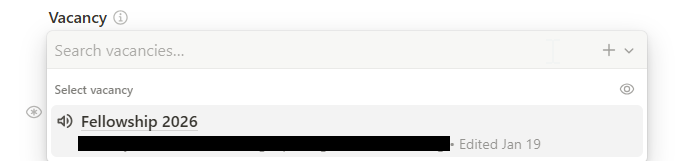
Is there a way to allow the general public to view this data inside forms via public link?
Before there were relationship fields in forms, we had been using complex automations to update static lists based on the related content from different apps as options in the forms - this approach is way too complex for most of my colleagues to understand and does require changes in code in case the app structure changes. If there’s a direct fix in how these fields are displayed in forms, that would be amazing!
Hi @erit,
thanks again for your kind words, really appreciate it! And I have great news for you: what you’re trying to achieve already works fully
You can absolutely use relationship fields in public forms and display related records without any workaround.
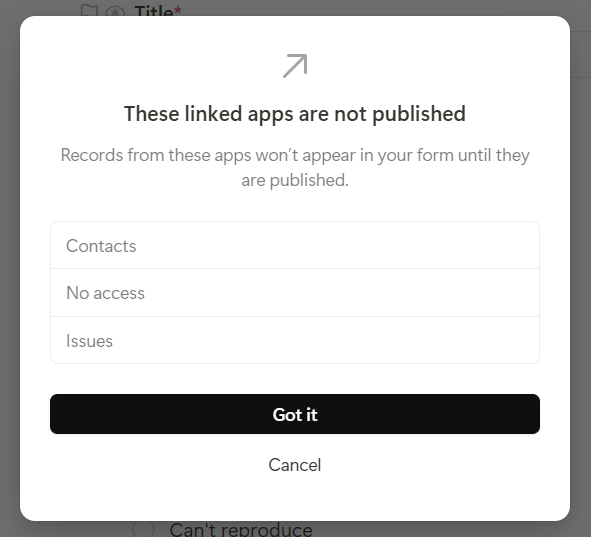
The only thing to keep in mind is permissions. Since this is a very sensitive area, we need to ensure that no data from other apps is unintentionally exposed. That’s why any app whose data is shown in a public form (via relationship fields) must also be explicitly published.
In your case, this is very likely the missing piece.
The easiest way to resolve it is:
During the publishing process, you’ll get a clear overview of all apps that are used via relationship fields in your form, like in the screenshot below. This shows you exactly which apps also need to be published so their data can appear in the public form.
Once those apps are published as well, the records will show up correctly in the public link.
If you have any further questions, feel free to reach out anytime.
Best,
Leo
Hi @Leo thank you for the quick reply and the great work you and Tape’s team have been doing!
Indeed, the related app was not published and publishing it does make the form work properly. This does raise a concern for me though: I am not 100% familiar with what publishing an app actually means from a data security standpoint: does anyone with access to the link also have access to all my app’s data? Or only its structure? Is there a way to limit which fields are published when I publish an app?
To keep the example of our Vacancies app: applicants should be able to see/choose the job they are applying to based on its title - and I can already filter which fields are visible in the form to make sure only certain data is made public (great feature by the way!). However, this app also contains other data (like whether a vacancy has already been filled, a target closing date for the vacancy and internal documents related to it) that should not be made public. I understand that a person filling the form does not necessarily have direct access to the published app link and therefore can’t see this other data, but, if someone did get access to the public link (be it by accidental sharing, a malicious attack or simply a “harmless” internet scraper), would it mean that they would have access to all the app data, even if the app itself is private within the organization? If that’s the case, then I can’t publish entire apps since they do contain extremely sensitive information, even though sharing certain fields in the context of forms might still be desirable.
Any clarification you could provide in this sense would be greatly appreciated!
Cheers,
P
Thanks so much for raising this @erit, it’s a really important question and I completely understand your concern 
Data security and permissions are something we take extremely seriously at Tape, so let me walk you through how this actually works.
First, the key thing to understand: publishing an app does NOT mean it becomes publicly visible on the web. It won’t show up in search engines, it can’t be found by crawlers, and it’s not “public” in that sense at all.
What publishing actually does is generate a secret share link that only users with Full Access or Can Share permissions can see and distribute. Think of this link as a secret key embedded in the URL. Only people who already have a permission level that would allow them to share the app’s content anyway can access or pass along this link. So there’s no new security exposure created by publishing. And if you ever unpublish the app, the link becomes invalid immediately, access is revoked right away, just like when you remove someone from an app or workspace.
This is actually the same reason we require apps to be published before their records show up in relation pickers. Without this, a user could potentially leak information from an app they don’t have permission to access, which would be a privacy leak. The publishing step acts as a deliberate safeguard to make sure permissions are respected consistently.
In practice, it’s a symmetric permission concept: you already control which fields in related records are visible in forms, and you could also configure the relation picker or relation cards to show all available fields.
I hope this gives you the confidence to use publishing for your Vacancies app without worry. Your sensitive data (like whether a vacancy is filled, closing dates, internal documents) stays protected by your permission settings regardless.
Let me know if you have any other questions!
Cheers,
Leo