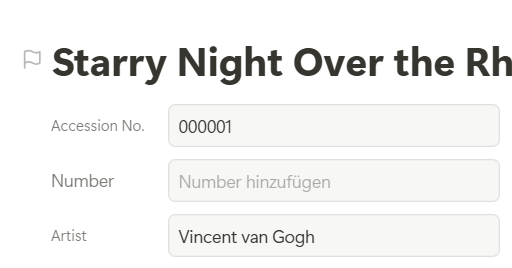
In the legacy record layout, it was easy to know that the top most field would be ‘pinned’ and visible at the top of the peak window after scrolling down a page.
That doesn’t happen in the new record layout. Understandably so because the page layout is so flexible and dynamic, there isn’t necessarily a ‘top’ field to choose.
But it makes it very hard to know/change what field will be visible as our ‘breadcrumbs’ reference once we start scrolling.
The only reliable workaround I’ve found at this time is to convert back to the old layout, customize field order there, then turn the new record layout back on. It’s tedious.
I wish we could ‘pin’ or set a title field easily in the new layout.
it always makes me really happy when our partners have exactly the same feature ideas that we have as well. For me, that is always a great sign that we are moving in the right direction.
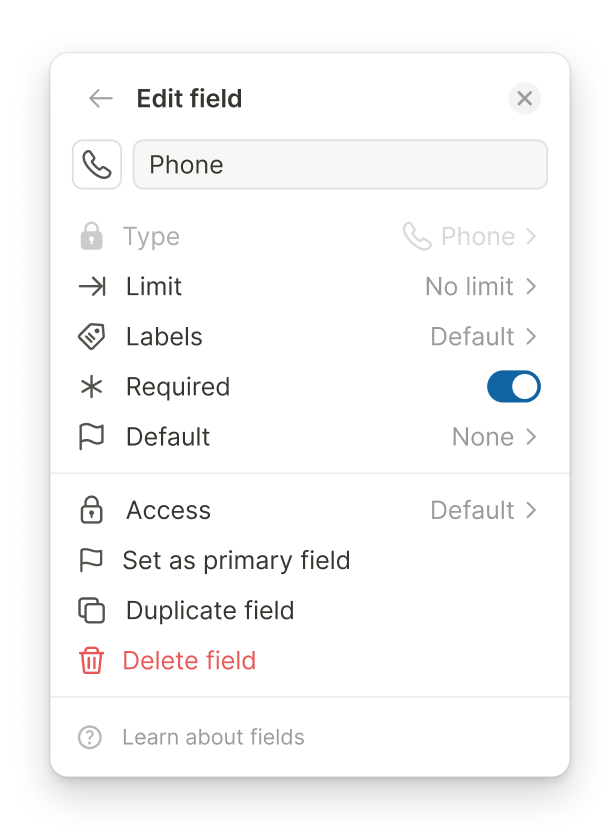
We actually already considered this during the concept phase of the new record experience. The idea is that any field can be selected as the Primary Field, and this will also be visible in the field template while in unlock mode. We show a small flag icon next to the field to indicate that it is currently selected as the Primary Field.
We have not enabled this yet, though. The reason is that we cannot unlock all new record features while users can still switch back to the classic record experience. Otherwise, it could become confusing, because we would not simply be able to switch back to the first field position in the classic record again. The selected field could jump back and forth depending on the experience being used, and we want to avoid that.
Your video actually shows very well how confusing this can be in practice. That is why we currently decided that, for now, the primary field is still determined by the first field position in the classic record. But once we have made the full switch to the new record experience, these new capabilities can be used properly.
So this is unfortunately a bit of a trade-off for now. We will either enable this once the classic record experience has been phased out, or at a later point when the full switch to the new record experience is possible.
Thanks again for the feedback and for sharing the idea. Here are two screenshots showing how the feature is planned to work: in each field setting, you will be able to select the Primary Field. If another field was previously selected as the Primary Field, it will automatically be removed there. In unlock mode, you will then see the indicator directly on the field.
yes, as @1F2Ns said - thanks for that insight @Leo
I can quite easily accept a quirky situation for a short period of time when I know that there has been valuable thinking behind the scenes.
It’s enjoyable to know that the Tape team has carefully thought of these things and has solutions planned, even if not yet implemented.
I will still mention, that while the Primary field selection and indicator will meet the primary need here,
I still believe there is value in considering the idea to be able to rearrange the linear list of field ID’s from the app developer settings list.
There are times that order of other field can be annoying such as in the automation in a ‘create item’ action and they have to be rearranged every time.
I’ve actually converted apps back to classic layout just to get that order set closer to how I’d like it. Then when converting back to new layout it’s much better to use in automations even though the fields aren’t perfectly linear of course.
It will get frustrating in the future if that ability is lost and no other rearrangement option exists other than setting a single primary field.
@Thaha yes. Being able to group them so that we can access them faster in automations or API without having to jump around a list of all fields and triple check if we got all the ones used in a particular section