[✅ Solution] GET Record does not deliver all fields

I know this isn’t new, but it’s very annoying. :exploding_head:
Is there an easy and not too buggy workaround for this issue?

image

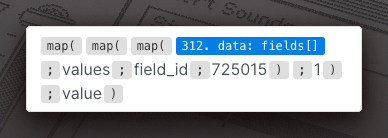
My app has around 60 fields, but with the API call GET Record, I only receive 32. Therefore, I’m unable to map the correct fields for further processing.

1 Like

Yeah. I have a hard time with this one too from time to time.

And how do you solve this?

My idea for a workaround is to format an existing calculated field (also in the API) so that it can display multiple values separated by commas. I would then split these values in the subsequent process using SPLIT and further process them using the respective INDEX.

However, that seems unnecessary to me since we have a well-functioning API. I would prefer if A) we could set a limit when using GET Record, or B) in the optional parameter Fields, we could send an array of field IDs that the API would return.

This issue doesn’t bother me a huge amount these days but it certainly did a while back, building solutions with say WebStudio on-top of Tape was a complete pain. The best workaround probably depends on the tool you are using, however some suggestions:

Best approach: Use field names instead of positions

  • In Node apps: Use JSONata or simple object property access
  • In Workers: Use .find() to locate fields by name (or JSONata if you want)
  • In Make: Map by field name rather than position (available in their field mapper, I believe)
  • In Node-RED: Built-in JSONata support for field selection

Alternative: Add middleware
If your tool requires positions:

  • Use a Worker between Tape and your destination to normalise the structure
  • Node-RED/n8n can also handle this transformation
  • @Luis has a helpful guide on using a JSON service for this

Workaround: Ensure fields have values
Place potentially empty fields at the end of your app and consider adding placeholder data to critical fields.

Finally (as you mention) create a simplified JSON within a calculation field (or the new plain text field) and ensure that is always at the correct location by making sure all the previous fields to it always have values @andrew.cranston has posted about this before although I think for different reasons.

Oh and the final way would be to send the record data via Webhook rather than the external app making the GET (this is how I did it a few times way back) and a final final note just in case pepole reading this are unsure:

The API GET call will always return a field value if the field has a value so if you have 60 fields with values you will get 60 fields if you have 60 fields but only 30 contain a value you will only get 30 fields.

What tool are you using to make the API call?

1 Like

In this case i work with MAKE and i map the data from TAPE via the Field ID.

image

So far, I cannot confirm that all fields containing a value are returned via the API. However, I will check this again. At least, that’s a glimmer of hope. :sparkles:

1 Like

A couple of further points on this subject:

  1. @Roman said this:

This is exactly correct and whilst not delivering empty fields can at first seem a pain and trust me I have sworn about it myself, I believe it is actually an example of a ‘well-functioning API’.
2. As whilst i was sure I had apps with more than 32 fields that I had got the full record details on I couldn’t actually find one or remember it definitely working so I wrote something that created an app with 40 fields and then a record with contents in all 40 fields then got the record and checked it delivered all 40 fields:

> node test-app.js

Testing Tape app 71630...

1. Getting app structure...
   API response: {
  "app_id": 71630,
  "workspace_id": 17108,
  "workspace_name": "Test zone",
  "slug": "zeta-well-40-fields-test",
  "external_id": "zeta-well-40-fields-test",
  "name": "Zeta Well 40 Fields Test",
  "record_name": "Entry",
  "item_name": "Entry",
  "position": 303021,
  "config": {
    "item_name": "Entry",
    "name": "Zeta Well 40 Fields Test"
  },
  "fields": [
    {
      "field_id": 735420,
      "external_id": "_1",
      "slug": "_1",
      "label": "1",
      "type": "number",
      "
   Found 40 fields
   Prepared 40 field values

2. Creating a record with all 40 fields populated...
   Create response: {
  "record_id": 171314650,
  "record_url": "https://tapeapp.com/melotteconsulting-demo/record/171314650",
  "app_record_id": 2,
  "app_id": 71630,
  "title": "1",
  "created_on": "2026-01-15 11:20:28",
  "created_on_utc": "2026-01-15 11:20:28",
  "last_modified_on": "2026-01-15 11:20:28",
  "last_modified_on_utc": "2026-01-15 11:20:28",
  "deleted_on": null,
  "deleted_on_utc": null,
  "app": {
    "app_id": 71630,
    "icon": "assignment",
    "name": "Zeta Well 40 Fields Test",
    "record_na
   Record created with ID: 171314650

3. Retrieving the record...
   Get response: {
  "record_id": 171314650,
  "record_url": "https://tapeapp.com/melotteconsulting-demo/record/171314650",
  "app_record_id": 2,
  "app_id": 71630,
  "title": "1",
  "created_on": "2026-01-15 11:20:28",
  "created_on_utc": "2026-01-15 11:20:28",
  "last_modified_on": "2026-01-15 11:20:28",
  "last_modified_on_utc": "2026-01-15 11:20:28",
  "deleted_on": null,
  "deleted_on_utc": null,
  "app": {
    "app_id": 71630,
    "icon": "assignment",
    "name": "Zeta Well 40 Fields Test",
    "record_na

4. Verifying all 40 fields are returned...
   Fields returned: 40
   Present fields: 1, 2, 3, 4, 5, 6, 7, 8, 9, 10, 11, 12, 13, 14, 15, 16, 17, 18, 19, 20, 21, 22, 23, 24, 25, 26, 27, 28, 29, 30, 31, 32, 33, 34, 35, 36, 37, 38, 39, 40

==================================================
✓ SUCCESS: All 40 fields returned correctly!
==================================================
1 Like

Thanks a lot @Jason :pray:

Hi Roman. We talked about one of the solutions in this Tape Partners Webinar https://www.youtube.com/watch?v=4Tpm7l1QzHQ

In that webinar, I used Tape automation and an external service called JSONBin to create a custom API with Tape fields using the order I needed.

I’m no longer using that approach and went with a Cloudflare Worker middleware that is considerably more flexible and possibly faster.

Let me see if I can modify the worker I created and share a public repo with the Tape community. Might be helpful for advanced API cases.

1 Like