The basic idea
A relation field connects records from one database app to records in another database app.
(More details here.)
For example:
- Database app:
 Shops
Shops - Database app:
 Orders (has a relation field connected to Shops)
Without any restriction in the relation field in Orders:
 Users see all shops
How to limit the selection
There are two main ways to do this:
Views
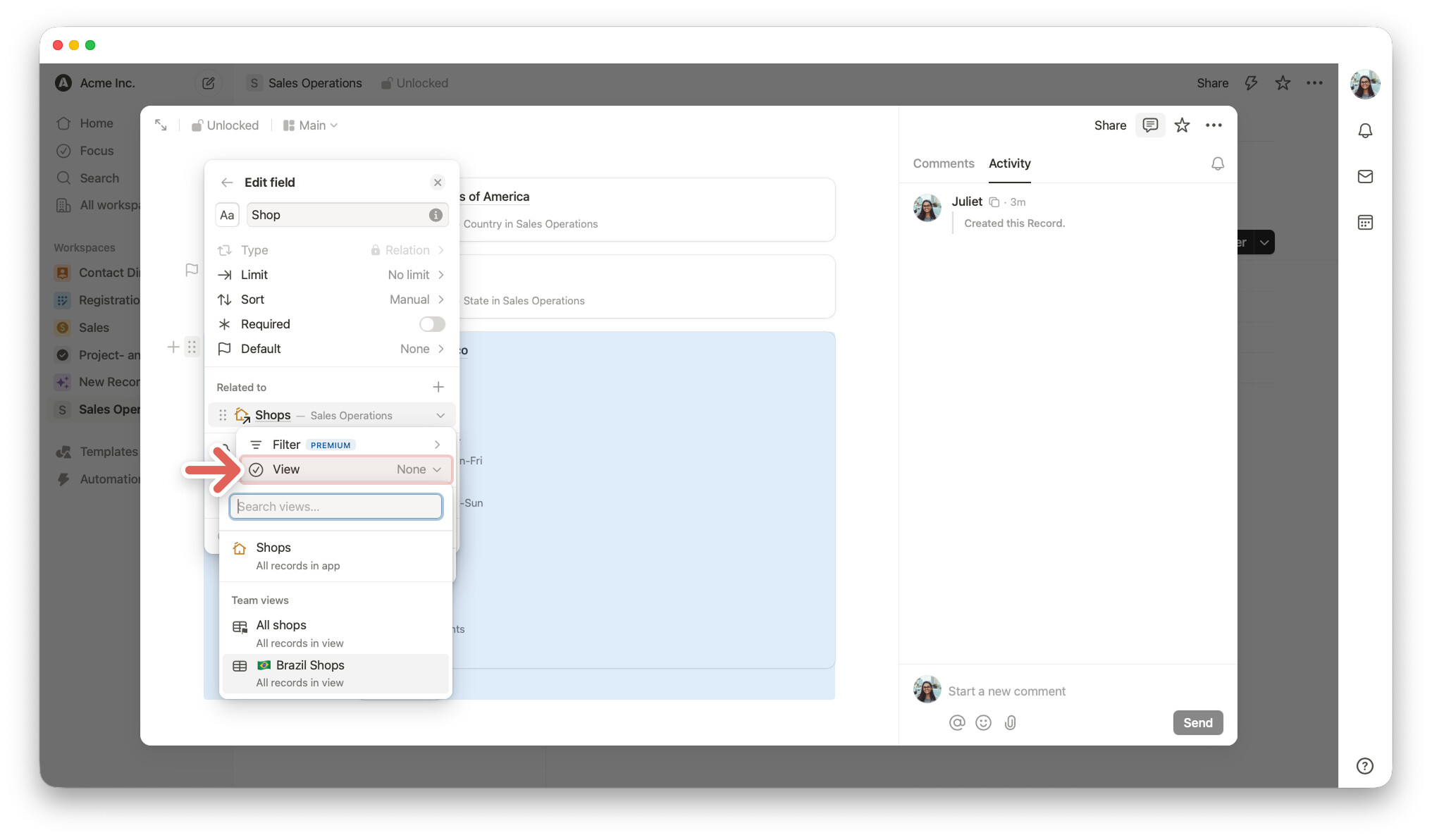
A view shows only records that match certain filter conditions and is saved in the related database. This view can be used in the relation field to limit which records users can select.
Example: In Shops, you create a view called Brazil Shops. It only shows shops where the Country field = Brazil.
When the relation field in Orders uses this view
Users only see records included in the view,
in this example, only shops from Brazil.
The relation field always shows the same set of records, no matter which record in the Orders database you open.
Dynamic filter (new)
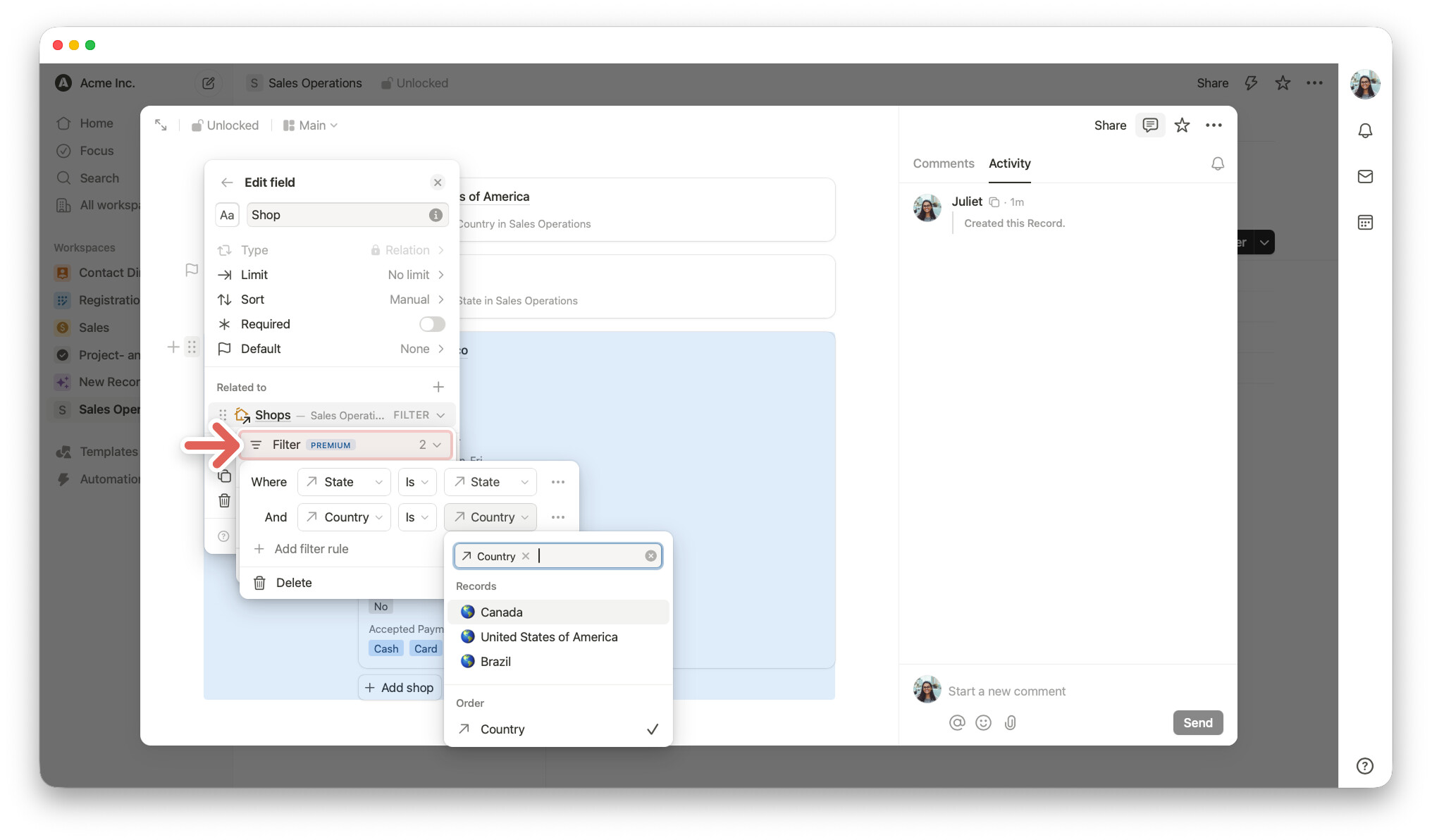
A dynamic filter works in a different way. It looks at the value in the current record and uses that value to decide which records should be shown in the relation field.
Example: Orders has a Country field. The dynamic filter matches that value with the country of each shop.
Example:
Order A (Country = Brazil)
→ user sees in the relation field shops in Brazil
The user change Country to Canada
→ user sees in the relation field shops in Canada
The user change Country to USA
→ user sees in the relation field shops in the USA
The available shops change based on the field value in the current order.
 Good to know about the filter setup:
- On the left, you choose the fields (State, Country) from the related database, in this example Shops
- On the right, you choose the value to match from the current record.
- For dynamic filtering, use a field from the current record, like “Country” in the screenshot.
The field types should fit together. For example, if the related field is a select field, use a select field in the current record. The same applies to text and relation fields.
If you set it up this way, the relation field only shows shops where the "Country in the Shops database matches the “Country” in the current record.
The key difference
- View used in a relation field → same selection for every record
- Dynamic filter used in a relation field → selection changes based on the current record’s field values
More filter options
1. Add more conditions
You can combine dynamic and static conditions.
Example: users only see shops that match both rules:
- Shop must have Wi-Fi = Yes
- Shop Country must match the Country in the current record
2. Choose what happens if a value is empty
Example:
- Off (default) → shops are still shown, even if the country value is empty
- On → no shops are shown until a country is selected
Some use cases for dynamic filtering:
Support: Filtering contacts by company
A support ticket has a Company field. Once a company is selected, users only see contacts from that company.
Sales: Linking products by category
An order has a Category field. Once a category is selected, users only see products from that category. Select Electronics, and only electronic products are shown.
HR: Assigning team members by skill
A task has a Skills required field, and People have a Skills field.
Once a skill is selected for the task, users only see people with matching skills.
Try it yourself, it’s great
Before, relation fields showed a fixed list of records. With dynamic filtering, they can now adapt to each record. This makes many more use cases possible. It is included in Tape’s Premium plan at no extra cost.
This has been one of the most requested improvements around relations, with feature requests from toni, 1F2Ns, and CarsonRedCliffLabs. Thanks so much for helping shape Tape.
Dynamic filtering is also supported in the mobile app and in forms.
We also created a  template for this setup. You can duplicate it here
Happy building,
Leo
