Questions about adding and removing fields in 'alternate' layouts

Now that the critical database fields (primarily Relation and Calculation fields) are available in the New Record Experience, we are excitedly preparing many apps to be converted into the new (and far superior) record layout.

While working on this, the Record Layout feature is incredibly valuable for testing ideas and discovering what is actually possible.
There are several questions that keep coming up however, and I’d like to see if @Tim, @Leo, or anyone else can offer official answers here.

Question 1: Is it possible to create a new field which is meant to be used in one specific layout and have it appear as hidden on the Main layout by default?

Example: I’ve been adding category fields for ‘Select view’ with rules to only show specific fields/sections of the record based on which option is selected.
This is helpful for building the desired ‘new layout’, but unfortunately this new select view field now automatically shows up floating around as a visible field in the classic record layout, or the main layout in the new record experience.
The result is either A) confusion for regular users who don’t know why this strange new field appeared in their app, or B) extra work to go and find/hide this new field in the main database.

link to video example:

https://www.loom.com/share/5e7fe6772aa148c889f5e368cfdae1d8

Question 2: Is it possible to delete a field from within an ‘alternate layout’ rather than just removing it from that one layout?

I understand that the Main layout is the ‘database’ record and all other layouts are just skins to choose how to display the info available in this database.
But we have found that we often start to add new fields to accommodate ideas for the layout being developed, but later remove those fields in favor of a different approach.
(please cut us some slack here, we are running tons of experiments just to figure out what is possible here with these new features!)
The result is that back on the Main Layout, we end up having many ‘junk’ fields floating around which actually aren’t ever used or wanted in any of the layouts.
The problem is that it can feel disruptive to the flow, and cost extra time/work if we have to switch back and forth to the main layout every single time a field needs deleted not just removed from the current layout view.

link to video example:

https://www.loom.com/share/8223a3ccaf904ac297f3a6b35ff9c7f8

Question 3: Will it be possible for different users (preferably different groups of users) to be assigned or able to select from different layout options as their own default?
Example: Certain fields make the most sense to be prominent and visible to a Sales Team, but other fields are more important for a Customer Service user to see at quick glance.
It would be awesome to have separate Sales and Customer Service layouts built. But it seems only one layout can be set as the ‘default’ layout for all users within an org. And only admin users with edit permissions can unlock an app and then toggle the option to view in a different layout.

Question 4: Will the documented limitation of ‘We recommend a maximum of 100 fields per database or form app’ continue to be true in the new record layout?
I can understand the need to have size limits for various reasons, including page load performance.
But we are quickly finding many ideas that could bring segmented data into a central more useable spot with the new record layout. This can cause the field count per database to quickly balloon beyond 100 fields however.

Example: In a setup for a solar installation company, we have previously used a Projects app as the main page and then a set of related apps such as an Installation app, an Inspection app, and a Financing app that get created and related back to the main project. The benefit of this is to give specific teams their own area to see data that’s only pertinent to them and to stay organized without having too many fields all crammed into the singular Project app.
Unfortunately, there are also several disadvantages to segmenting data in this way.
One example would be trying to run certain reports. It becomes impossible to cross filter when data points are stored in separate apps. AKA, we might want to see how many projects had a financing approval delay that also failed an inspection in the past quarter. Although that data is tracked in the system, we can only see financing delays from the financing app and failed inspection tags in the inspection app. But the combination of that data is not filterable from the primary project app, which would be necessary to ultimately answer our question. We have to take exported data into an Excel spreadsheet, then spend a lot of time combine and cross filter this info to get the answer.

All of that being said, if we could combine the idea that was mentioned in question one about using ‘select view’ category options for teams to focus in on what matters to them, or having pre-set layouts assigned to the different teams, it would allow different categories of users to still easily focus on the relative data to them, but still track the complete data picture from one database. All the data points in one app allows for superior cross-filtering success.

The nerdy side of me is excited that I could make that happen using this new layout in tape. However, I don’t want to get too excited and go down that path if the 100 field limitation is a hard rule which would ultimately stop us from being able to track that much data all in one single app database.
It almost feels like the rules/limitations have to be adjusted in order to take full advantage of what this new layout is truly capable of.

If you made it this far, thanks for taking the time to read and consider my rambling ideas!

2 Likes

I love reading info dumps like this @CarsonRedCliffLabs. Getting a walk through your thought process in real time is fascinating. :chart_with_upwards_trend::rocket:

2 Likes

Hi @CarsonRedCliffLabs,

First of all, thank you so much for taking the time to explore the new Record Experience and the new layout capabilities in such depth already :100:

It really means a lot to us that you are experimenting with this at such an early stage, building real layouts, testing ideas, and sharing detailed feedback. For us, this is extremely valuable because it gives us real-world input from people who are using the feature without having been involved in all the internal thinking and design decisions behind it. Since we built the feature, we naturally look at it through a slightly biased lens, so feedback like this is exactly what helps us improve it.

I’ll go through your questions one by one. I’d actually like to start with question 3, because it also gives a bit of context for the overall direction.


Question 3: Different default layouts for different users or user groups

Yes, this is definitely part of the direction we are planning for Record Layouts.

What you are seeing right now is still a very first foundational version of layouts. We intentionally introduced the concept early, even before all the “real” layout features are available, because layouts are deeply connected to how records are opened, routed, and loaded in the new Record Experience. This is not something we could easily add later without rebuilding a lot of the foundation again.

So the current version is more like the base layer.

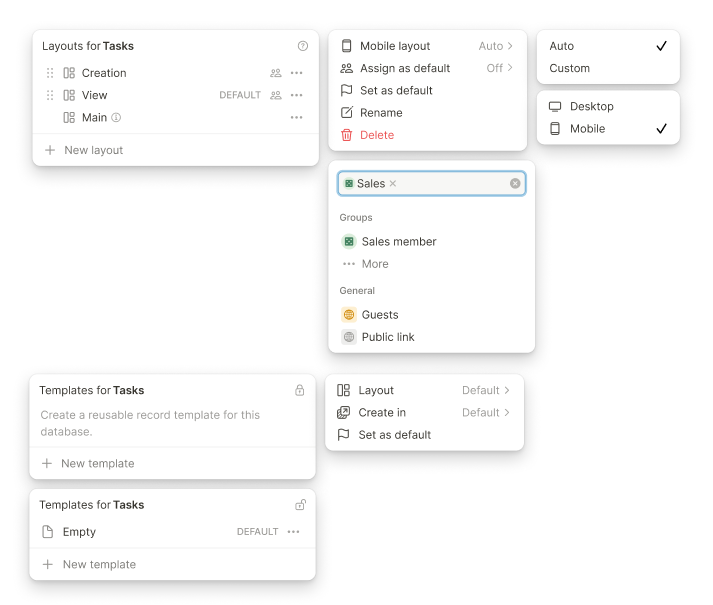
The use case you described is absolutely one of the main reasons layouts exist in the first place. In the future, we want to support things like:

  • assigning layouts to specific user groups
  • assigning layouts to specific views
  • defining dedicated layouts for record creation
  • allowing admins to decide which layouts regular users may switch between
  • potentially using layouts for special purposes like print-focused views
  • dedicated mobile layouts with fewer fields or a different field order

A very common use case is exactly what you mentioned: a Sales team may need a different record experience than a Customer Service team. Another common case is record creation, where the creation layout often contains only a small number of required fields, while the full record layout after creation contains much more information.

So yes, this is planned in the foundation. The current version simply does not expose all of those capabilities yet.


Question 1: Creating fields in an alternate layout without showing them on the Main layout

Right now, the Main layout is intentionally designed to behave like the classic Podio-style app creator layout. That means it reflects the actual database structure: all fields, their order, and the general app schema.

The reason for this is that we still need one place where the full database structure can be clearly seen and managed. Field order is also relevant in other places, for example in tables, views, dropdowns, and other parts of the product. Because of that, newly created fields currently appear in the Main layout by default.

That said, your suggestion is very interesting: when a field is created inside an alternate layout, it could potentially be added to the Main layout in an “always hidden” state by default. This would allow the field to exist in the database, but not suddenly appear to regular users in the Main layout.

We need to verify this carefully, but I think it is a very valid idea and exactly the kind of feedback we want to collect during this phase.

One important note: we will not invest new feature work into the old/classic record experience anymore, because this is a transition phase and the old record will be phased out in the coming months. So improvements around this will happen in the new Record Experience and the Main layout there.

Longer term, we also expect that many partners and power users will use the Main layout mainly for database maintenance, while most productive user-facing work will happen in dedicated layouts. In that sense, alternate layouts can also become a kind of staging environment: you can build and test a new layout without exposing it to regular users immediately, and once it is ready, assign it or make it the default for the right audience.

So I agree that the current behavior can create friction, especially while old and new record experiences still exist side by side. We’ll take your idea into our evaluation.


Question 2: Deleting fields from an alternate layout

Yes, this is already possible, but intentionally not as direct as removing a field from the layout.

In an alternate layout, removing a field from the layout only removes it from that layout. It does not delete the actual database field.

The reason is safety. Layouts are meant to be very easy and fast to edit, almost like working in a document. If pressing delete, backspace, or removing multiple selected elements could also permanently delete database fields, it would be very easy to accidentally destroy a lot of real production data, especially in apps with thousands of records.

That is why we made a deliberate distinction:

  • In alternate layouts, removing a field removes it from that layout only.
  • To permanently delete the field, open the field menu, click Edit Field, and delete it from the field edit page.
  • In the Main layout, the experience is closer to the classic app/database editing behavior.

This extra step is intentional. It protects users from accidentally deleting fields and their data while experimenting freely in layouts.

So the short answer is: yes, you can delete the field from an alternate layout, but you need to go through Edit Field first.


Question 4: The 100-field recommendation

I completely understand your point here, and we have discussed this internally as well.

The new Record Layouts naturally make people want to bring more data into one central app, because layouts can make large records much easier to structure and navigate. Your solar installation example is a great one: from a reporting and filtering perspective, having the data in one app can be much more powerful than spreading it across several related apps.

The 100-field recommendation is not a hard technical limit. Similar to Podio, you can create more fields than that. However, we still recommend staying around that number where possible.

The reason is performance across the whole system. It is not only about the record layout itself. You also have to consider tables, filters, views, calculations, automations, imports, exports, reports, server-side load, and client-side rendering.

For example, an app with 200+ fields and 10,000+ records means a lot of data and metadata needs to be handled. We are continuously optimizing this, but at a certain point there will naturally be performance trade-offs, both on the server side and on the user’s device. Older or weaker machines will feel this more strongly.

So the practical answer is:

100 fields is still the range we can confidently recommend and support for consistently strong performance.

More than 100 fields can work, especially if the app is configured carefully. For example, if views only show the fields that are actually needed, records are structured with tabs or rules, and not every field is rendered everywhere at once, the experience can still be very good.

But once an app goes far beyond that recommendation, it becomes something that should be designed carefully by an experienced partner or builder like you who understands the performance implications. We do not want to promise that every configuration with hundreds of fields will perform equally well in every situation.

So I would not say “don’t do it,” but I would say: do it intentionally, test it carefully, and keep performance in mind across all related features.


I hope this answers your questions and gives a bit more context on where we are going with Record Layouts. I’ve also added a few example screenshots below to give you a better idea of some of the layout-related features we are planning.

Again, thank you for testing this so deeply already and for sharing such thoughtful feedback. This is exactly the kind of input that helps us shape the feature in the right direction.

If I missed anything or if more questions come up while you continue experimenting, please feel free to share them anytime.

Best,
Leo

2 Likes

First, to @1F2Ns - I appreciate that you can find enjoyment and fascination in the mad ramblings from the mind of an excited nerd. I totally know what you’re talking about there!

To @Leo - I must say again - holy crap! THANK YOU

I have many many thoughts on the specific things I just learned from your response. I will have to circle back to those a bit later.

For now, just know that yet again, you have far exceeded my expectations.
Beyond any of the ‘cool features of Tape’ which I now have a deeper understanding of…it blows my mind :exploding_head: that you are a native German speaker. Yet your answers in English are more clear and succinct than I could imagine to communicate.
Within 8 hours you have given a 10/10 answer. If I was smart enough to know multiple languages, it would probably take me more than 8 hours to merely see and digest the initial message. Then another 2 hrs to type out an answer as valuable as yours. And probably another 1 hr to translate from my brains native language to the language in the community forum. And still another 2 hrs to proof read and make sure my translated answer still makes sense. How do you do it?

It makes me kind of mad that you are clearly so much smarter than me on many levels! haha :heart:

3 Likes

I wish the forum allowed us to have different reactions beside :heart:

You all are the best.

2 Likes