In the new Relationship field, there is a premium feature allowed to limit results using a View or a Filter Rule. It can even include Dynamic Filtering which is amazing.
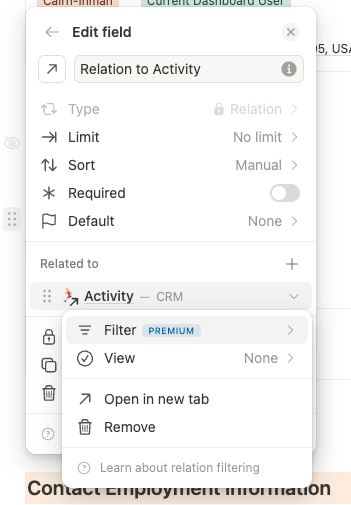
The new References block does not have this feature however.
Is there any way to make the same premium feature available for references?
In our perfect set up, we would prefer to have two separate inbound reference blocks for tasks.
One block would be called “Next Steps” or “Unfinished Tasks” and ONLY show the tasks that point back at the contact but have an incomplete status.
We could then sort this field by the Due Date value listed. Thus we would easily see the overdue or upcoming tasks for the contact.
The second block would be called “Activity Summary” or Completed Tasks" and it would ONLY show the tasks that point back at the contact but have a completed status selected. This field would be sorted by the Completed On Date value listed and make it easy for any user to glance and see what recent activity has actually been logged for the contact.
Because the current Reference field can’t filter beyond which app it’s pulling from, we don’t have a perfect way to set up the fields for Next Steps and Activity Summary as we need.
Those fields technically can be set up using calculation fields…but that approach loses the ability to interact with the data inline. Such as changing a task status without leaving the current page.
The current ‘best’ option is to limit the reference field to the task app and sort by or group by date. But unfortunately both of these approaches allow for the possibility of an overdue task to get missed easily.
In summary, to paint the picture of our desired ‘perfect’ set up, it would allow us to have a:
Next Steps Reference Field
- Inbound reference
- Filtered to show only incomplete tasks
- Sorted to show oldest Due Dates at the top of the list
- Ability to inline edit task status choices from the contact page (which is why a calc field doesn’t suffice)
THEN a separate
Activity Summary Reference Field
- Inbound reference
- Filtered to show only completed tasks
- Sorted to show most recent Completed On Dates at the top of the list
This short video walkthrough highlights the current options and the concerns with those options:
https://www.loom.com/share/8d9a2813b06341558ec8f55d41c61d62

