Hi @Leo
Thanks for heads up, I look forward to play around with it!
Best Jon
1 Like
 number field
Hi! We’re very excited about the new experience, looks great! But we have two questions:
-
When are you expecting this to be released in full (a few features we use are still lacking, but we understand they will be developed/made available soon enough, but that means we can’t really make the switch yet)? We know it sometimes can be hard to say exactly when things will be released in full, but even if you could only provide some vague guidance to let us know if it’s weeks away from launch, or if it’s expected early next year, or somewhere in between, that would be appreciated.
-
For how long after the full release can we expect both versions of the record experience to be available (we’re thinking of when we should plan to make the switch for all users)?
2 Likes
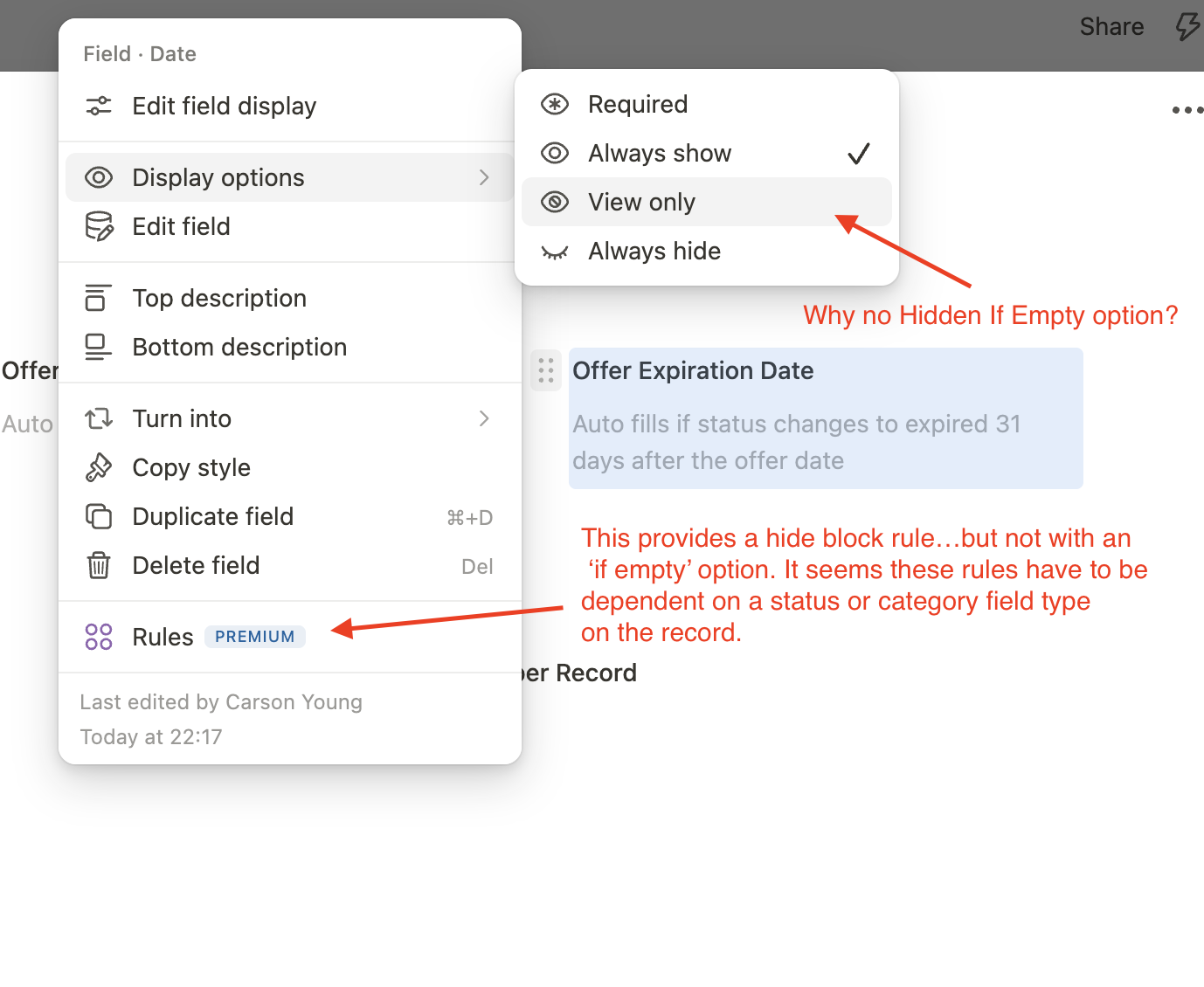
Can someone help me understand what I’m missing for a ‘hidden if empty’ option in the new record layout?
1 Like
Hi @GH_SE,
Thank you so much, we’re really happy to hear that you’re excited about the new Record Experience 
We’re putting a lot of care and effort into this to make it truly outstanding, a real step forward and to create a USP in the market.
Regarding your first question:
It’s still a bit difficult to give a precise timeline. We have 12 field types left, with varying complexity.
Our goal is to have all field types in place this year, ideally more towards late summer or early autumn rather than the very end of the year.
Instead of waiting for one big release, we’ll continue shipping improvements and new field types continuously. This means the overall picture will become clearer step by step as more pieces are completed.
Regarding your second question:
You can already start switching individual apps to the new experience today. As we get closer to the release, we’ll also allow switching entire organizations earlier, even before the final release, so teams can test things in real scenarios.
We haven’t finalized how long both versions will run in parallel, but we currently expect around one month, possibly a bit longer, after full release.
The transition should be very smooth, as setups and defaults will carry over. Bu we’ll coordinate the final switch closely with our community and partners.
Best regards,
Leo
3 Likes
Thank you so much for pointing this out, really appreciated!
I actually spent quite some time trying to understand this and first thought it might be related to the date field specifically, but in the end it turned out to be something much simpler.
We accidentally had a feature flag set on this option. This means it was only visible to the Tape development team, but hidden for everyone else. That’s why we didn’t notice it at first.
The good news is that we already have a fix in the pipeline, and it will be released tomorrow. After that, the “hidden if empty” option will be visible again for everyone.
Thanks again for catching this, and have a great weekend!
Best,
Leo
3 Likes
Hi @Leo … in the past we also discussed, that “hidden if not empty” would be as useful as “hidden if empty”.
In processes there are certain fields, which only need to be set once and never be changed again. You don’t even want to see it anymore. If needed at all, I could still show the hidden field again, same way I show “hidden if empty” fields manually.
Is this still a thing?
3 Likes
Hi @dirk_s,
great to hear from you!
Yes, this is still on our radar. However, the current approach is to handle this via Rules rather than Display Settings.
The idea is to keep the Display Settings intentionally lean and focused only on the most common use cases, to avoid overload.
In Rules, we already have the “Hide Block” and “Show Block” actions. We plan to extend these so that blocks hidden by such a rule can still be shown again manually when needed. On top of that, we only need to add the corresponding filter conditions like “is empty” and “is not empty” to fully cover your use case
So the feature is still planned, just implemented through Rules instead of Display Settings
Best regards and have a great day!
Leo
3 Likes
This is perfect, that’s all we really need to know for now! Looking forward to do the switch over our records!
2 Likes
Hey Tape Team, hey @Leo, the new Record Experience has been a game changer for us! Records now look way cleaner and using Rules for showing/hiding fields really bring our workflow to the next level.
There is one field type that I’m still missing before some of our main apps can be fully switched to the new UX: Checklists. Is there any prediction, when they’ll become available?
Thank you a lot in advance and keep up the great work! 
2 Likes
@erit FWIW we previously used checklists fields for many use cases. Over time however, we’ve shifted away from those and almost exclusively use related items for the same functions that our checklists were serving.
With the new options with how related items can work, we find that we can get a view and functionality that is essentially the same as the checklist field type, but even more powerful with automations and reporting for these unfinished ‘checklist’ type tasks stored in their own database app.
Maybe adjusting to that approach will unlock those remaining apps that you can’t convert quite yet.
3 Likes
Hi @erit,
thank you so much for your kind words. It really means a lot to us 
Even back when we were Podio users, we always felt that conditionally shown fields can be a real game changer. And honestly, with the new Record Experience, we feel like we are only at the beginning of discovering what this can unlock. We still believe this will become even more powerful with everything that is ahead.
About the Checklist field: it is currently one of the last field types on our list for the new Record Experience. The reason is that we want to rebuild some important foundations here, so we can deliver a really great experience, for example creating checklist items from everywhere, linking them to other records later, private checklist items, and more.
That is why @CarsonRedCliffLabs suggestion is actually a really strong one. Until the Checklist field is available, using a Relation field can be a very good alternative. With the list view for related records, it already gets very close to a task list. You can also work with status, date, and soon member fields inline.
We are also thinking about inline creation for Relation fields as part of this topic, so it could become a real alternative to checklist fields, with the extra benefit that you can filter in the related sub task database, use automations more easily, report on the items, and so on.
So yes, this could really be a good path for your remaining apps in the meantime. And the Checklist field is not too far away anymore. We are talking about a few months, and as mentioned in my post above, we are currently aiming for late summer or early autumn for the full switch to the new Record Experience.
Thanks again for your support, your feedback, and for using Tape. It is amazing to hear that we could excite you with the new Record.
Have a great weekend!
Leo
5 Likes
Dev team transparency will NEVER get old.
4 Likes
Hello, I want to ask you if there is possible to say when field “Phone” from old view will be available in New record experience? Thank you. 
1 Like
Hi @Samuel222,
We are making very good progress with the remaining field types
This means that we plan to start working on the next field package Phone, Email, and Link in the next few days. We currently expect the development to take a few weeks.
These fields are a bit more advanced, especially because multi-value fields require a row system with multi-collaboration, multi-select, and related logic. So they are more complex than, for example, a simple Number field.
But we are optimistic that we can release these fields within the next few weeks.
Best regards!
Leo
2 Likes